




15 Best AI Tools to Make Money Online in 2026
Compare the best AI tools to make money online in 2026 by free-plan value, output quality, commercial use, automation potential, and freelancer ROI.

The best AI tools to make money are not necessarily the most expensive or popular. They are tools that help you deliver a valuable service faster, improve quality, automate repetitive tasks, or create products clients are willing to buy.
For freelancers, students, creators, solopreneurs, and small businesses, a practical starting stack can cost nothing: one general AI assistant, one design or video tool, and one workflow tool. Paid subscriptions become worthwhile only when they save enough time or help generate enough revenue to exceed their monthly cost.
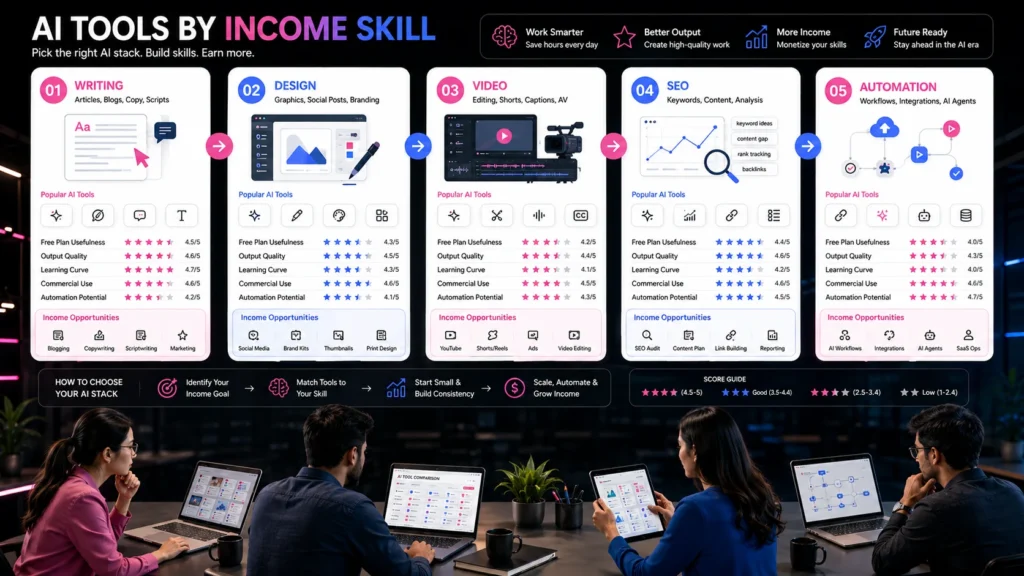
This guide compares 15 tools by free-plan usefulness, output quality, learning curve, commercial-use considerations, automation potential, and value for money. It also explains which tools are useful for writing, design, video, SEO, research, productivity, and automation.
For a broader service-building framework, read How to Earn Money Online With AI in 2026 – a related StartupMandi Global guide on turning AI skills into practical freelance offers.
Quick Summary
- ChatGPT and Claude are strong starting points for writing, research, and client communication.
- Canva and CapCut are accessible options for design and short-form video.
- Perplexity is useful for research workflows that require linked sources.
- Zapier and Make help freelancers sell workflow automation.
- Semrush and Surfer are more suitable for SEO professionals with recurring client work.
- Paid plans are worth considering only after validating demand.
Important: Tool features, pricing, usage limits, commercial rights, and regional availability can change. Verify the official product page before purchasing or promising a capability to a client.
How Were These AI Tools Evaluated?
The tools were evaluated as income-enabling tools, not as entertainment or novelty applications.
Each tool received a practical assessment across six criteria:
| Evaluation Criterion | What It Measures |
|---|---|
| Free-plan usefulness | Whether beginners can complete real work without paying |
| Output quality | Accuracy, consistency, polish, and editing requirements |
| Learning curve | How quickly a new user can become productive |
| Commercial use | Whether client or commercial work is permitted |
| Automation potential | Ability to connect with workflows, APIs, or other apps |
| Value for money | Whether the subscription can reasonably pay for itself |
The scores below are directional rather than laboratory measurements. They reflect common freelance workflows, official product documentation, current pricing pages, and practical use cases. A high score does not mean every tool is best for every person.
Upwork reported that demand for AI-related skills grew 109% year over year in 2026, while AI video generation and editing grew 329% and AI integration grew 178%. This suggests that tools connected to real deliverables may have stronger commercial potential than general experimentation. Upwork’s 2026 skills report provides the reported marketplace data.
Which AI Tools Help With Writing?
Writing tools help freelancers produce drafts, briefs, newsletters, scripts, proposals, product descriptions, and marketing copy.
Is ChatGPT Worth Using For Freelance Work?
ChatGPT is the strongest all-purpose starting tool for many freelancers. It supports brainstorming, drafting, editing, summarization, structured analysis, image understanding, and workflow experimentation.
| Category | Score |
|---|---|
| Free-plan usefulness | 4/5 |
| Output quality | 4/5 |
| Learning curve | 5/5 |
| Commercial usefulness | 4/5 |
| Automation potential | 5/5 |
| Value for money | 4/5 |
Best services: SEO briefs, blog outlines, social captions, email drafts, proposals, research frameworks, and client communication.
The free plan is useful for learning and occasional projects. Paid plans become more attractive when you need higher usage, advanced reasoning, file analysis, deeper research, or regular production work. OpenAI’s official pricing page lists multiple paid plans, but exact availability and pricing can vary by region and billing arrangement. ChatGPT pricing provides the current plan information.
Is Claude Good For Long-Form Content?
Claude is particularly useful for long documents, editing, detailed briefs, structured writing, and maintaining context across complex instructions.
| Category | Score |
|---|---|
| Free-plan usefulness | 4/5 |
| Output quality | 4.5/5 |
| Learning curve | 4/5 |
| Commercial usefulness | 4/5 |
| Automation potential | 4/5 |
| Value for money | 4/5 |
Best services: Long-form editing, policy documents, content strategy, proposals, reports, and brand voice development.
Anthropic’s developer documentation covers API access, authentication, messages, tools, rate limits, and SDKs. That makes Claude useful beyond chat when a freelancer wants to build a repeatable client workflow. Claude API documentation provides the technical reference.
Can Grammarly Improve Client Deliverables?
Grammarly is less useful as a complete content generator and more useful as a final quality-control layer. It helps with grammar, clarity, tone, conciseness, and professional polish.
| Category | Score |
|---|---|
| Free-plan usefulness | 4/5 |
| Output quality | 4/5 |
| Learning curve | 5/5 |
| Commercial usefulness | 4/5 |
| Automation potential | 3/5 |
| Value for money | 4/5 |
Best services: Editing, proofreading, email polishing, website copy review, and professional communication.
It is particularly useful for students and freelancers who have strong ideas but need cleaner English or more consistent tone.
Which AI Tools Help With Design?
Design tools can help you produce social posts, presentations, thumbnails, brand concepts, product mockups, and marketing assets.
Is Canva AI Useful For Freelancers?
Canva is one of the most accessible AI tools for students, creators, and small businesses. Its value comes from combining templates, brand controls, stock assets, collaboration, and AI-assisted design in one workspace.
| Category | Score |
|---|---|
| Free-plan usefulness | 4.5/5 |
| Output quality | 4/5 |
| Learning curve | 5/5 |
| Commercial usefulness | 4/5 |
| Automation potential | 3/5 |
| Value for money | 4.5/5 |
Best services: Instagram carousels, thumbnails, presentation decks, lead magnets, posters, and social-media packages.
Canva’s official India pricing page shows a free plan and paid options, with billing and features dependent on the selected plan and team size. Canva India pricing should be checked before quoting a fixed cost to clients.
Is Midjourney Worth Paying For?
Midjourney is strongest for stylized visual concepts, illustrations, campaign directions, editorial artwork, and creative exploration. It is less suitable when a client needs precise product accuracy, editable layouts, or consistent text inside images.
| Category | Score |
|---|---|
| Free-plan usefulness | 2/5 |
| Output quality | 5/5 |
| Learning curve | 3.5/5 |
| Commercial usefulness | 4/5 |
| Automation potential | 3/5 |
| Value for money | 3.5/5 |
Best services: Campaign concepts, mood boards, editorial illustrations, fantasy visuals, and creative assets.
Confirm the current commercial-use terms before delivering generated work. Also explain to clients that AI images may require further design, retouching, or licensing review.
Can Figma AI Support UI Work?
Figma is valuable for interface design, prototypes, wireframes, design systems, and collaboration. AI features can accelerate exploration, but they do not replace product thinking or user research.
| Category | Score |
|---|---|
| Free-plan usefulness | 4/5 |
| Output quality | 4/5 |
| Learning curve | 3/5 |
| Commercial usefulness | 4/5 |
| Automation potential | 4/5 |
| Value for money | 4/5 |
Best services: Landing-page wireframes, app prototypes, design systems, and client-ready UI concepts.
This tool is more suitable for freelancers who already understand basic design principles.
Which AI Tools Help With Video?
Video is a strong income category because brands need regular Reels, Shorts, product demos, tutorials, and repurposed content.
Is CapCut Good For Video Freelancing?
CapCut is beginner-friendly for editing short-form content, adding captions, removing pauses, creating transitions, and repurposing longer recordings.
| Category | Score |
|---|---|
| Free-plan usefulness | 4/5 |
| Output quality | 4/5 |
| Learning curve | 4.5/5 |
| Commercial usefulness | 3.5/5 |
| Automation potential | 3.5/5 |
| Value for money | 4/5 |
Best services: Reels, Shorts, subtitle editing, creator content, podcast clips, and product videos.
CapCut states that subscription prices can vary by region, device, and promotion. Check pricing inside the relevant web, desktop, or mobile application before purchasing. CapCut’s pricing guidance explains this regional variation.
Can Descript Help Sell Content Services?
Descript combines transcription, text-based editing, screen recording, audio editing, and video production. Its text-based workflow can save time when turning interviews, podcasts, or webinars into clips.
| Category | Score |
|---|---|
| Free-plan usefulness | 3.5/5 |
| Output quality | 4/5 |
| Learning curve | 4/5 |
| Commercial usefulness | 4/5 |
| Automation potential | 4/5 |
| Value for money | 3.5/5 |
Best services: Podcast editing, webinar repurposing, transcription cleanup, and social video production.
It is worth paying for when the time saved per project exceeds the subscription cost.
Is ElevenLabs Useful For Voice Work?
ElevenLabs is designed for AI voice generation, narration, dubbing, and audio experimentation. It can support videos, training content, podcasts, and accessibility workflows.
| Category | Score |
|---|
| Category | Score |
|---|---|
| Free-plan usefulness | 3.5/5 |
| Output quality | 4.5/5 |
| Learning curve | 4/5 |
| Commercial usefulness | 3.5/5 |
| Automation potential | 4/5 |
| Value for money | 3.5/5 |
Best services: Voiceovers, narration, dubbing, explainer videos, and audio prototypes.
Obtain consent before cloning or imitating a person’s voice. Do not create deceptive political, financial, medical, or personal content.
Which AI Tools Help With SEO?
SEO tools help with keyword research, competitor analysis, content briefs, technical audits, on-page optimization, and reporting.
Is Semrush Worth Paying For?
Semrush is a comprehensive SEO platform with keyword research, competitor analysis, backlink data, rank tracking, content tools, and technical auditing.
| Category | Score |
|---|---|
| Free-plan usefulness | 2.5/5 |
| Output quality | 4.5/5 |
| Learning curve | 3/5 |
| Commercial usefulness | 5/5 |
| Automation potential | 4/5 |
| Value for money | 4/5 |
Best services: SEO audits, keyword research, competitor reports, content strategies, and monthly retainers.
It is usually too expensive for a beginner who has no client workflow. It becomes worthwhile when one recurring client covers the subscription cost.
Can Surfer Help With Content Optimization?
Surfer is focused on content optimization, topic coverage, SERP analysis, and on-page recommendations. It can help writers create more structured briefs and identify missing subtopics.
| Category | Score |
|---|---|
| Free-plan usefulness | 2.5/5 |
| Output quality | 4/5 |
| Learning curve | 4/5 |
| Commercial usefulness | 4/5 |
| Automation potential | 3.5/5 |
| Value for money | 3.5/5 |
Best services: SEO content briefs, optimization audits, editorial recommendations, and content refreshes.
Do not follow every recommendation blindly. Search intent and usefulness matter more than maximizing an optimization score.
Which AI Tools Help With Research?
Research tools can help freelancers gather sources, summarize documents, compare information, and prepare briefing notes.
Is Perplexity Useful For Client Research?
Perplexity is useful when you need conversational research with linked sources and a quick starting point for a topic.
| Category | Score |
|---|---|
| Free-plan usefulness | 4/5 |
| Output quality | 4/5 |
| Learning curve | 5/5 |
| Commercial usefulness | 4/5 |
| Automation potential | 3.5/5 |
| Value for money | 4/5 |
Best services: Competitor briefs, industry research, content research, market summaries, and source discovery.
Always open and verify important sources. A citation does not automatically make every generated statement accurate.
Which AI Tools Help With Automation?
Automation tools create some of the highest-value opportunities because they connect AI to existing business processes.
Is Zapier Good For AI Automation?
Zapier helps connect applications, forms, spreadsheets, email tools, CRMs, and AI steps. Freelancers can use it to build lead-routing, reporting, content, onboarding, and support workflows.
| Category | Score |
|---|---|
| Free-plan usefulness | 3.5/5 |
| Output quality | 4/5 |
| Learning curve | 3.5/5 |
| Commercial usefulness | 5/5 |
| Automation potential | 5/5 |
| Value for money | 4/5 |
Zapier’s official pricing page lists a free plan with 100 tasks per month, while paid plans begin from published starting prices and scale according to task usage. Zapier pricing provides the current structure.
Best services: CRM automation, lead notifications, content workflows, customer-support triage, and reporting.
Is Make Better For Complex Workflows?
Make is useful for visual, multi-step automations with branching logic, data transformation, and more detailed workflow control.
| Category | Score |
|---|---|
| Free-plan usefulness | 4/5 |
| Output quality | 4/5 |
| Learning curve | 3/5 |
| Commercial usefulness | 5/5 |
| Automation potential | 5/5 |
| Value for money | 4.5/5 |
Best services: Multi-step business operations, data synchronization, automated reporting, and AI-agent workflows.
Make may offer stronger value for technically curious freelancers, but its learning curve is higher than simple two-step automation tools.
Which AI Tools Are Best For Free Users?
The best free AI tools for freelancers are those that let you complete real work without forcing an immediate subscription.
| Tool | Best Free Use | Main Limitation |
|---|---|---|
| ChatGPT | Drafting, ideation, basic analysis | Usage and feature limits |
| Claude | Editing and long-form drafts | Usage limits |
| Canva | Social graphics and templates | Premium assets and features |
| CapCut | Short-form editing | Export and feature restrictions may vary |
| Perplexity | Source discovery | Research limits |
| Grammarly | Basic proofreading | Advanced tone and rewriting limits |
| Zapier | Testing simple workflows | Limited monthly tasks |
| Make | Learning automation | Operation limits |
Students should begin with free tiers and build portfolio work before paying. Freelancers should upgrade only when a tool removes a clear bottleneck.
Which AI Tools Are Best For Paid Users?
Paid tools are worth considering when you have recurring work, client demand, or a measurable time-saving opportunity.
| User Type | Suggested Paid Upgrade |
|---|---|
| Content freelancer | ChatGPT or Claude |
| Social-media designer | Canva Pro |
| Video freelancer | CapCut Pro or Descript |
| SEO consultant | Semrush or Surfer |
| Automation specialist | Zapier or Make |
| Voice creator | ElevenLabs |
| UI freelancer | Figma plan with collaboration features |
Use a simple break-even formula:
For example, if a tool costs ₹2,000 monthly and your net margin is 80%, you need approximately ₹2,500 in additional revenue to cover it.
Do not buy a tool because it is trending. Buy it when a client, deliverable, or repeatable workflow justifies the expense.
What Is A Beginner Freelancer AI Stack?
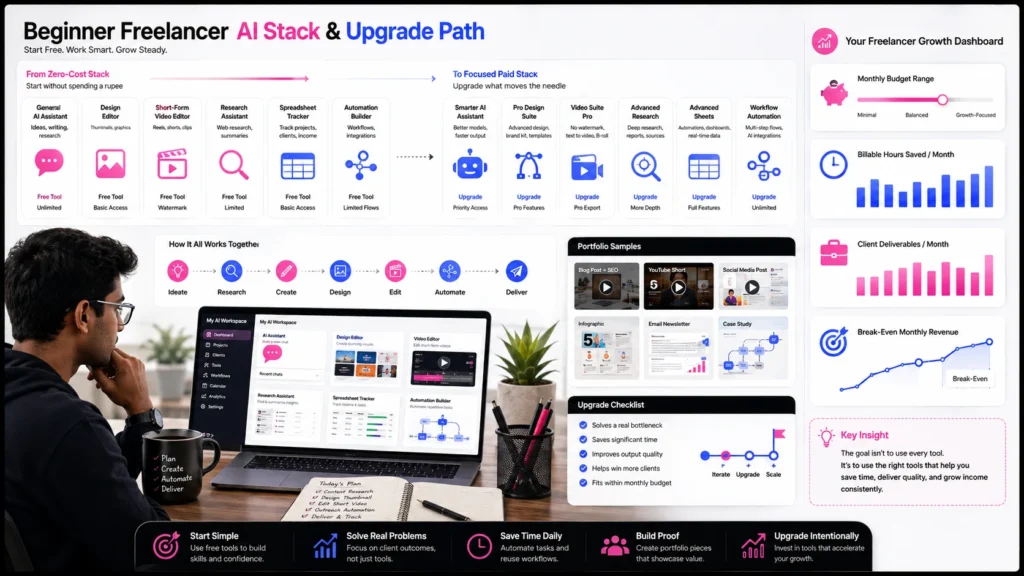
A beginner freelancer should start with a small stack that covers one income skill and basic business operations.
What Is The Zero-Cost Stack?
- ChatGPT or Claude for drafting and research.
- Canva Free for basic visual assets.
- CapCut Free for short-form editing.
- Google Sheets for tracking leads and deliverables.
This stack can support simple writing, social-media, video, and research services. The key is to choose one service instead of advertising every capability.
What Is The Starter Paid Stack?
A practical starter paid stack could include:
- One general AI assistant.
- Canva Pro or a comparable design tool.
- Zapier or Make for workflow automation.
- A niche tool only after securing relevant client work.
A monthly budget of ₹2,000–₹5,000 may be enough for a focused workflow, depending on regional pricing and subscriptions. Avoid paying for duplicate tools that perform the same function.
For beginner income models, read How Beginners Can Start Earning Money Online Without Investment – a related StartupMandi resource for exploring low-cost online work.
Which AI Tools Are Actually Worth Paying For?
An AI tool is worth paying for when it improves one of four measurable outcomes:
- It reduces delivery time.
- It improves client quality.
- It enables a higher-value service.
- It helps you serve more customers without lowering standards.
Use this decision checklist:
| Question | If The Answer Is “Yes” |
|---|---|
| Does it save at least two hours monthly? | Consider a trial |
| Can one client cover the cost? | Consider upgrading |
| Does it unlock a service you can sell? | Build a portfolio offer |
| Can you export and deliver usable work? | Check commercial rights |
| Does it integrate with your workflow? | Test automation |
| Is the output reliable after review? | Use it professionally |
Do not calculate ROI using generated words or images alone. Calculate it using completed deliverables, billable hours saved, client retention, or additional revenue.
What Risks Should You Check Before Selling AI Work?
Before using any of the best AI tools to make money, review privacy, licensing, commercial rights, accuracy, and disclosure requirements.
Pay attention to:
- Whether client data is stored or used for training.
- Whether the plan permits commercial use.
- Whether generated assets contain restricted elements.
- Whether an AI output requires disclosure.
- Whether the tool can reproduce copyrighted or private material.
- Whether human review is needed for sensitive work.
Do not use AI-generated information as final legal, medical, financial, or compliance advice without qualified review.
Frequently Asked Questions
1. What are the best AI tools to make money online?
ChatGPT, Claude, Canva, CapCut, Perplexity, Semrush, Surfer, Zapier, Make, and Descript are practical choices when connected to a sellable service.
2. What are the best free AI tools for freelancers?
ChatGPT or Claude, Canva Free, CapCut Free, Perplexity, Grammarly Free, Google Sheets, and the free plans of Zapier or Make are useful starting points.
3. Which AI tool is best for students?
A general AI assistant combined with Canva and a note-taking or research tool is usually enough to learn content, design, research, and productivity workflows.
4. Can AI tools guarantee freelance income?
No. Tools can improve speed and output, but income depends on skill, positioning, client demand, outreach, quality, and reliable delivery.
5. Should I pay for ChatGPT or Claude?
Upgrade when the free plan limits recurring work or when advanced features save enough time to cover the subscription.
6. Are AI-generated images safe for commercial use?
Commercial use depends on the tool’s current terms, plan, source assets, and the type of content created. Review licensing before delivery.
7. Which AI tools are best for automation services?
Zapier and Make are strong starting points. Advanced freelancers can add APIs, webhooks, databases, and agent frameworks.
8. How many AI tools should a beginner use?
Start with two or three tools. Add another only when it solves a specific workflow problem or enables a service clients will pay for.
Key Takeaways
- The best tool is the one connected to a sellable outcome.
- Free plans are sufficient for learning and portfolio development.
- Paid plans become worthwhile when they create measurable ROI.
- ChatGPT, Claude, Canva, CapCut, and Perplexity suit many beginners.
- Semrush, Surfer, Zapier, and Make are stronger for specialized services.
- Always review commercial rights, privacy, accuracy, and disclosure requirements.
Next Steps
- Choose one income skill: writing, design, video, SEO, research, or automation.
- Select one primary AI tool and one supporting tool.
- Create three portfolio examples for a specific customer type.
- Track the time saved and quality improvements.
- Upgrade only after the tool supports real paid work.
Conclusion
The best AI tools to make money online in 2026 are not shortcuts to effortless income. They are productivity multipliers that help you research, create, design, edit, optimize, and automate more effectively.
Start with free AI tools for freelancers, build one focused service, and test demand before purchasing several subscriptions. When a paid tool saves time, improves delivery, or enables a higher-value offer, it can become a sensible business investment.
For a practical income roadmap, read How to Earn Money Online With AI in 2026 – a guide to turning AI capability into sellable services.
Ready To Share Your AI Expertise?
Do you have practical knowledge about AI tools, automation, freelancing, technology, business, finance, marketing, SEO, or content creation? You can become a publisher for StartupMandi Global and share useful insights with readers interested in professional growth.
Become a Publisher – StartupMandi Global – Explore the publisher page and submit your AI tutorial, tool review, workflow guide, case study, or expert article for consideration.
Transparency note: This article is educational and includes a promotional reference to StartupMandi Global. Tool pricing, free-plan limits, commercial rights, features, and publisher approval requirements may change.
Resources For Further Research
- OpenAI ChatGPT pricing – Check current plans and regional availability.
- OpenAI prompting guidance – Improve output reliability through clearer instructions.
- Claude API documentation – Explore API workflows and technical integrations.
- Canva India pricing – Verify free and paid plan details.
- Zapier pricing – Review task limits and automation pricing.