A modern technical SEO checklist ensures your site is crawlable, indexable, and fast for both traditional and AI-driven search systems, so new content gets indexed in hours—not weeks. By fixing crawl paths, Core Web Vitals, and metadata, you give crawlers clean signals and secure higher rankings on competitive queries. This guide gives SEO pros and developers a step-by-step, AI-ready checklist.
Quick SEO Summary
- Prioritise crawlability: robots.txt, clean internal links, and XML sitemaps that only list canonical, index-worthy URLs.
- Tighten indexability: correct meta robots, canonical tags, and handling of duplicates, redirects, and parameter URLs.
- Optimise Core Web Vitals (LCP, CLS, INP) and mobile-first UX to win tiebreaker ranking boosts.
- Add structured data for entities and actions so both classic search and AI systems understand your content.
- Use log file analysis and Search Console to monitor real crawl behaviour and shorten time-to-index.
What Is a Technical SEO Checklist (Today)?
A technical SEO checklist is a structured list of checks ensuring search engines can crawl, render, index, and rank your site efficiently, without wasting crawl budget. It covers crawlability, indexability, performance, mobile-first readiness, security, and structured data as core pillars.
Search engines like Google first crawl, then index, then rank pages based on signals like content quality, speed, and mobile usability. If technical barriers block crawling or indexing, even great content stays invisible.
“Crawlability and indexation form the bedrock of SEO visibility. Even the most optimized content remains invisible if search engines cannot efficiently discover, crawl, and index it.” – OWDT Technical SEO Guide
Start with crawlability, because what bots cannot reach, they cannot rank.
How Do I Optimize Crawlability for Fast Discovery?
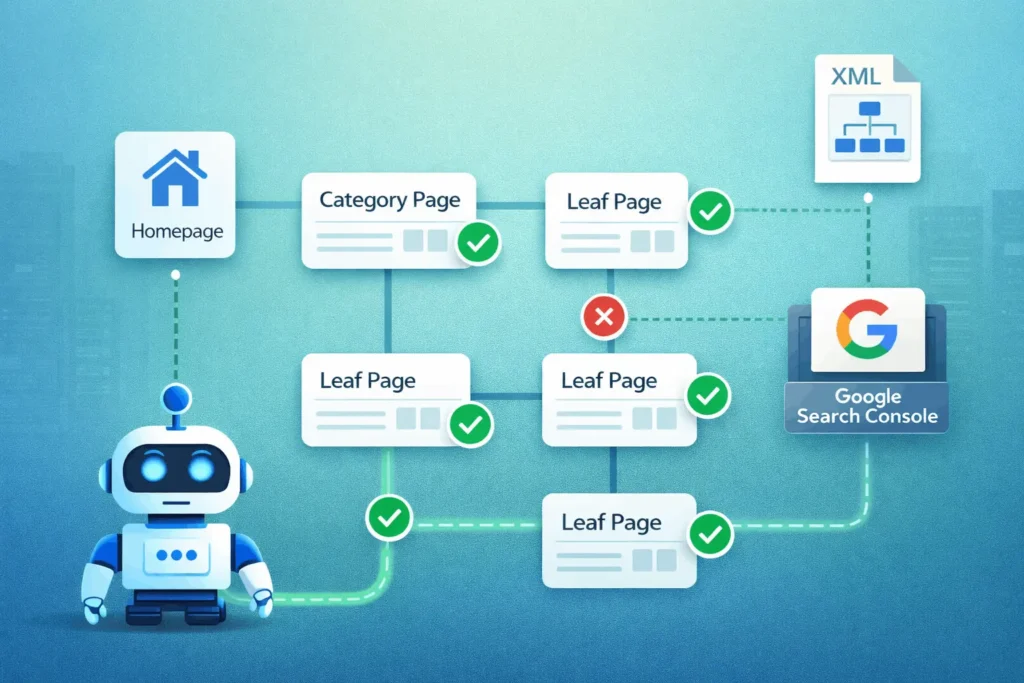
Crawlability is the ease with which crawlers (Googlebot, Bingbot, AI crawlers) can access and traverse your URLs through links, sitemaps, and directives. You want bots spending time on valuable pages instead of dead ends.
- Harden robots.txt (But Don’t Over-Block)
- Fix Broken Links and Redirect Chains
- Strengthen Internal Linking Architecture
- Submit and Maintain XML Sitemaps
Once bots can reach your URLs, ensure they are actually indexable.
How Do I Ensure Indexability and Canonicals Are Correct?
Indexability is whether a crawled URL is eligible and suitable to be included in the search index. Misconfigured directives can silently block critical pages.
- Meta Robots and X-Robots-Tag
- Canonical Tags for Duplicate and Variant URLs
- Handle Parameters, Pagination, and Alternate Versions
- Check Index Coverage Regularly
With indexability aligned, performance and UX become ranking tiebreakers.
Why Are Core Web Vitals Critical for Higher Rankings?
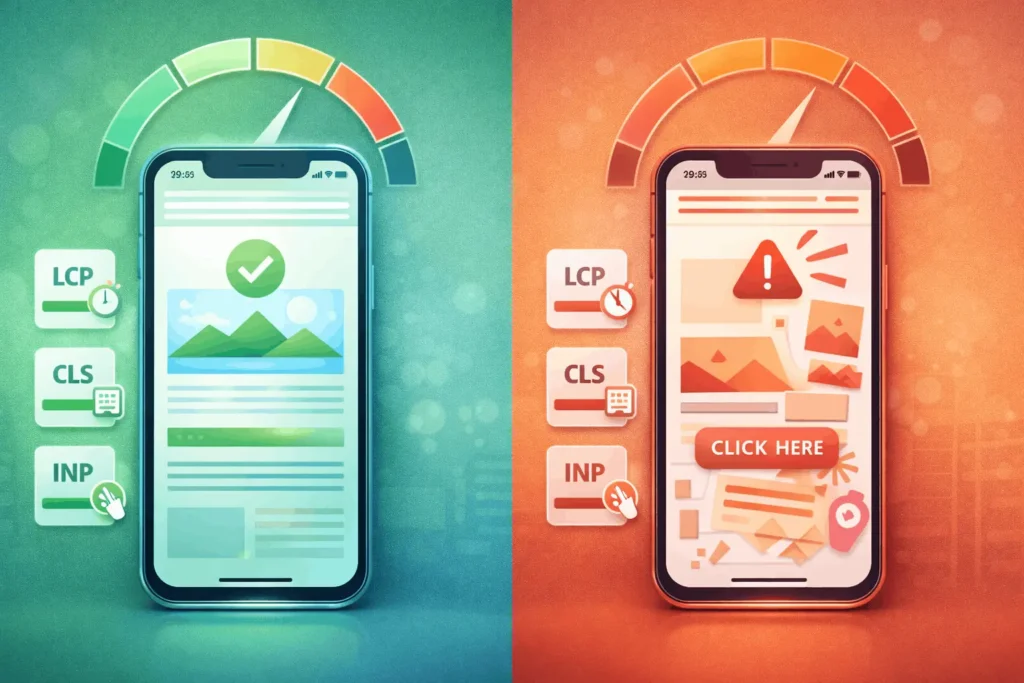
Core Web Vitals (LCP, CLS, INP) are official page experience signals and can be a ranking tiebreaker when content relevance is similar. Faster, more stable pages are rewarded.
Google’s page experience update elevated these metrics as SEO-relevant signals. One analysis cited in industry research found that “slow” domains, failing Core Web Vitals, had 3.7 percentage points lower visibility than “fast” ones.
- Largest Contentful Paint (LCP) – Aim <2.5s on mobile; optimise images, fonts, and server TTFB.
- Cumulative Layout Shift (CLS) – Aim <0.1; reserve space for images/ads and avoid late-loading UI shifts.
- Interaction to Next Paint (INP) – Replaces FID; keep most interactions under 200ms by reducing heavy JS.
“If two sites have equally relevant content, the one with better Core Web Vitals can rank higher.” – Weblogic
| Core Web Vital | Good Threshold | Key Fixes |
|---|---|---|
| LCP | <2.5 seconds | Optimise hero media, server response |
| CLS | <0.1 | Pre-allocate space, avoid layout shifts |
| INP | <200 ms | Defer JS, reduce main thread work |
Mobile-first and security form the next foundation.
How Do I Align with Mobile-First Indexing and Security?
Google primarily uses the mobile version of content for indexing and ranking. If mobile hides content or is broken, you lose index coverage.
- Responsive, Not Separate, Where Possible
- Mobile Usability
- HTTPS Everywhere
- Clean URL Structures
Now add machine-readable context with structured data.
How Do I Use Structured Data for AI Crawlers and Rich Results?
Structured data (Schema.org) helps search and AI systems understand entities, products, FAQs, and how-to processes beyond plain text. It boosts eligibility for rich results and AI answers.
- Pick the Right Schema Types
- Follow Google’s Rich Result Guidelines
- Support AI Overviews and Answer Engines
Example FAQPage snippet:
{
  "@context": "https://schema.org",
  "@type": "FAQPage",
  "mainEntity": [{
    "@type": "Question",
    "name": "What is technical SEO?",
    "acceptedAnswer": {
      "@type": "Answer",
      "text": "Technical SEO ensures search engines can crawl, render, and index your site efficiently."
    }
  }]
}

Next, we tie everything together with a practical how-to process.
How To: Run a 30-Day Technical SEO Audit for Fast Indexing
A 30-day technical SEO process covering crawlability, indexability, Core Web Vitals, structured data, and monitoring to speed up indexing and strengthen rankings.
Steps:
- Map Site and Prioritise Critical URLs
Identify top categories, product pages, and content hubs; crawl with Screaming Frog or similar to export URL inventory and key status codes. - Audit Crawlability and robots.txt
Review robots.txt for accidental blocks, test key URLs in “URL Inspection”, and fix broken internal links and redirect chains across critical paths. - Clean and Optimise XML Sitemaps
Generate fresh sitemaps containing only canonical, 200-status URLs; remove noindex, redirect, and param URLs; declare sitemap in robots.txt and submit to Google Search Console. - Fix Indexability and Canonicals
Check meta robots and canonical tags; ensure important pages are indexable and self-canonicalised; consolidate duplicates with canonical and redirects. - Improve Core Web Vitals and Mobile UX
Use PageSpeed Insights and CrUX to identify LCP, CLS, and INP issues; prioritise image optimisation, JS reduction, and responsive fixes on high-value templates. - Add or Refine Structured Data
Implement valid schema for Organization, BreadcrumbList, and relevant content types; test with Rich Results tool; monitor in Search Console Enhancements. - Analyse Logs and Search Console Data
Run log file analysis to see real Googlebot behaviour; align crawl frequency with business-critical URLs; monitor index coverage and Core Web Vitals reports weekly.
Tools Name: Google Search Console, Screaming Frog (or Sitebulb), PageSpeed Insights, Log file analyser
Materials Name: Server access/logs, XML sitemap files, Robots.txt file, Template-level codebase
With the process defined, we address common questions.
FAQ: SEO
Technical SEO is the part of Search Engine Optimization that ensures your site can be crawled, rendered, indexed, and served efficiently by search engines and AI systems
For most sites, quarterly audits are recommended; large or fast-changing sites may need monthly checks to catch issues early
For well-optimised sites with clean sitemaps and internal linking, new URLs can be indexed within hours to a few days; slower or complex sites can take longer
Yes, they are page experience signals; in competitive SERPs, better Core Web Vitals can give a visibility advantage when relevance is similar
No, only canonical, index-worthy URLs should be included; exclude 404s, redirects, parameters, and noindex pages
Not required, but it enhances understanding and eligibility for rich results and AI summaries, which can improve visibility and CTR
Log files show real bot activity—what Google actually crawls—revealing crawl waste, ignored sections, and technical errors invisible in standard crawls
HTTPS is a lightweight ranking factor and a strong trust signal; Google explicitly recommends securing all sites with HTTPS
Key Takeaways
- Crawlability and indexability are non-negotiable foundations—robots.txt, internal links, and clean XML sitemaps drive fast discovery.
- Canonical, meta robots, and parameter handling protect your index from duplicates and low-value URLs.
- Core Web Vitals and mobile-first indexing influence rankings as page-experience tiebreakers, especially on competitive queries.
- Structured data and clear information architecture help both search and AI crawlers understand entities and relationships, improving rich result eligibility.
- Log file analysis and Search Console are your reality check, aligning crawl budget with business goals and revealing hidden issues.
Next Steps
- This Week
- This Month
- Quarterly
- Rerun full technical audit and compare metrics (index coverage, CWV scores, crawl stats).
- Update your technical SEO checklist and share with dev/SEO teams.
- Evaluate impact on rankings and time-to-index for new content.
Soft CTA: Download StartupMandi’s technical SEO checklist template to plug into your existing workflows and ensure nothing critical slips through.
Conclusion
A robust technical SEO checklist for fast indexing and higher rankings aligns crawlability, indexability, Core Web Vitals, and structured data into one repeatable process. When search engines and AI crawlers can discover, understand, and trust your site’s infrastructure, every new page has a fair shot at ranking quickly.
For SEO professionals and developers, this is not a one-time project but a living system. StartupMandi can support you with a downloadable checklist, implementation guidance, and ongoing audits—pair this framework with our other resources on content SEO and site architecture to build a truly search-first, AI-ready web presence.
This article is for educational purposes and does not replace a full technical audit for your specific stack. Always test changes in staging and coordinate with your development and devops teams.
Few Links Suggestions for more Research & Facts Check:
- Google Crawling & Indexing Overview – Official documentation on how Google discovers and indexes pages.
- Technical SEO Checklist 2026 (WsCubeTech) – Practical summary of key areas including mobile, HTTPS, and speed.
- Technical SEO Checklist: Crawlability & Indexing Focus – Detailed 2026 checklist for crawl and index control.
- Core Web Vitals and SEO Impact – Explanation of LCP, CLS, INP and their role in rankings.
- Log File Analysis for SEO – Advanced guide to understanding real bot behaviour and crawl budget.