Your startup’s website isn’t just a digital brochure—it’s your first impression, lead-generation machine, and credibility statement all rolled into one. Yet most founders launch websites without checking critical elements, leaving money on the table.
The truth? Studies show that 53% of website visitors leave if a page takes more than 3 seconds to load. Add poor mobile design, confusing navigation, or weak calls-to-action, and your bounce rate skyrockets. But here’s the good news: A systematic website design checklist prevents these costly mistakes.
This guide covers the 15 must-check elements every startup founder needs before launch, with actionable steps to ensure your site converts visitors into customers, investors, or leads.
Book your free website audit — No credit card required. Our team will review your site, identify 3-5 high-impact opportunities, and show you exactly where your conversions are leaking.
What Makes a Website Design “Work” for Startups?
Website design isn’t about looking pretty—it’s about solving a business problem. For startups, that problem is typically:
- Generating qualified leads (for B2B SaaS or services)
- Driving conversions (for e-commerce or subscription models)
- Building investor confidence (for fundraising-stage startups)
- Establishing credibility quickly (when no track record exists)
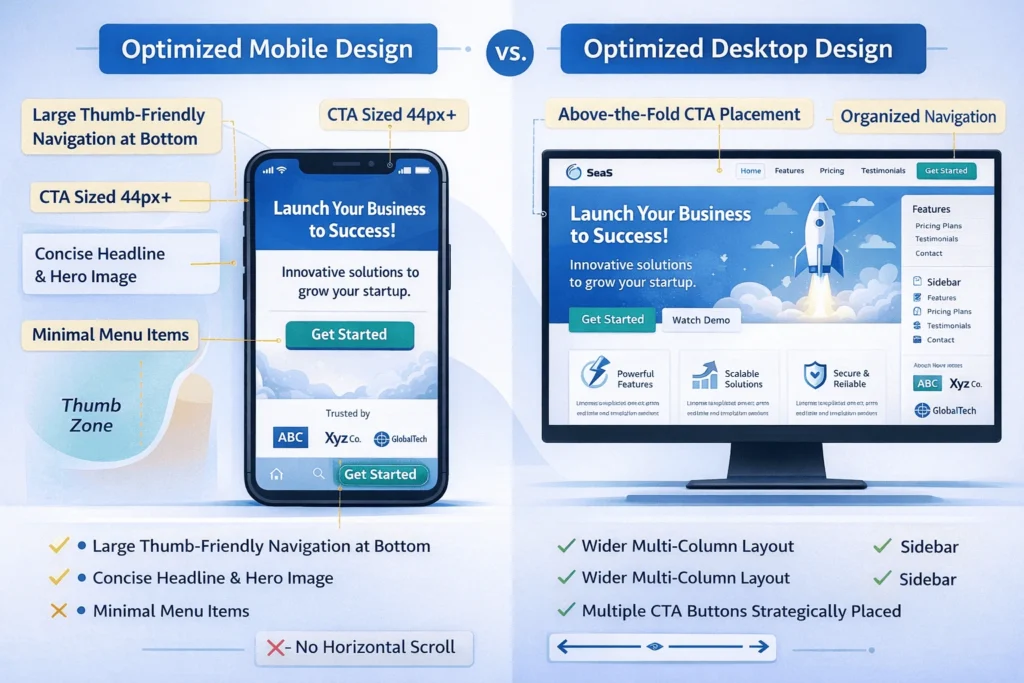
A website that achieves even one of these goals will outperform 90% of startup competitors. The key is alignment: every design element, from your color scheme to your CTA placement, should push visitors toward one clear goal.
Let’s break down the checklist.
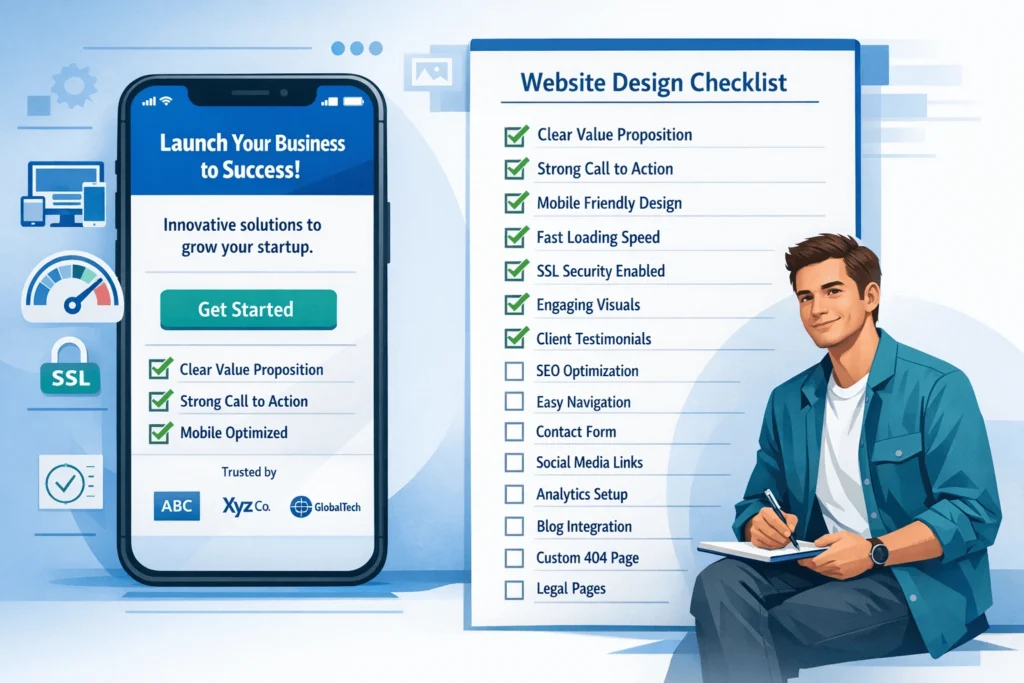
15-Point Website Design Checklist for Startup Success
1. Define Your Primary Goal (Before You Design)
What’s your website’s core objective?
- Lead generation (capture emails, schedule demos)
- Direct sales (e-commerce transactions)
- Investor confidence (pitch deck + team credibility)
- Content/education (build authority in your niche)
Why this matters: Without a clear goal, every design decision becomes guesswork. Your homepage layout, CTA placement, and even color choices should align with this single objective.
Startup founder tip: As a founder, your goal is usually lead generation or credibility. Optimize for that first. Everything else is secondary.
2. Mobile-First Responsive Design (60% of traffic comes from mobile)
Non-negotiable: Your website must look and function perfectly on phones, tablets, and desktops.
Checklist items:
- Test on real devices (iPhone, Android, iPad) using Chrome DevTools
- Verify navigation is thumb-friendly (buttons sized 44px+ diameter)
- Confirm no horizontal scrolling (horizontal scroll = instant bounce)
- Check that images scale correctly without distortion
- Ensure forms are easy to fill on mobile (large input fields, minimal typing)
“Mobile responsiveness isn’t optional in 2026. It’s foundational,” says research from ContentSquare. With over 60% of web traffic coming from mobile, poor mobile design kills conversions instantly.
Check with: Use Google’s Mobile-Friendly Test → https://search.google.com/test/mobile-friendly
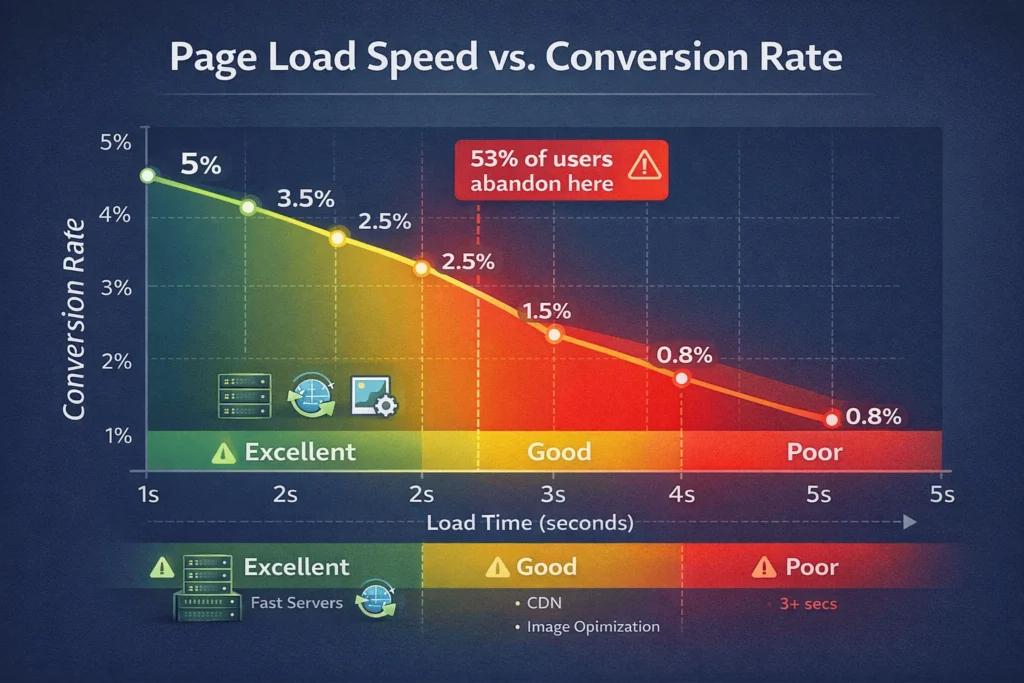
3. Page Load Speed Under 3 Seconds (Every 1 second delay = 7% conversion loss)
Slow websites kill conversions. Google research shows 53% of mobile users abandon sites taking >3 seconds to load.
Optimization checklist:
- Use a CDN (Content Delivery Network) for global speed
- Compress images (use WebP format instead of JPEG)
- Enable lazy loading for images below the fold
- Minimize CSS and JavaScript (remove unused code)
- Cache static assets (leverage browser caching)
Quick win: Run your site through Google PageSpeed Insights → https://pagespeed.web.dev
Target: <2.5 seconds load time on mobile, <1.5 seconds on desktop
4. Clear Information Architecture (2-3 clicks to any page)
Visitors need to find what they want in seconds. If your navigation confuses them, they leave.
Structure test:
- Draw your sitemap on paper (homepage → main categories → pages)
- Test navigation with 3 friends (can they find key pages in under 10 seconds?)
- Ensure max 2-3 menu items per dropdown
- Include a search bar on the main menu (helps users bypass navigation)
Example:
- Home
- Solutions/Services (or Product)
- About
- Blog
- Contact (or Demo)
5. Hero Section with Clear Value Proposition (First 10-20 seconds matter)
Users decide in 10-20 seconds if your site is relevant. Your hero section (above-the-fold content) must immediately answer:
“What does this company do?” + “Why should I care?”
Startup design best practice:
- One clear headline (avoid creative ambiguity)
- 2-3 line supporting subheading explaining the benefit
- One prominent CTA button (matching your goal)
- Optional: Hero image/video (must be fast-loading)
Example:
- Headline: “Automate Your Payroll in 5 Minutes”
- Subheading: “Tired of manual payroll? Our platform calculates taxes, generates reports, and files everything automatically. Save 10 hours per week.”
- CTA: “Start Free Trial”
6. Prominent, Action-Oriented Call-to-Action (CTA) Buttons
Your CTA is where conversions happen. Most startup websites bury CTAs or make them too generic.
CTA best practices:
- Visually distinct – Use contrasting colors (if site is light, use bright blue/green)
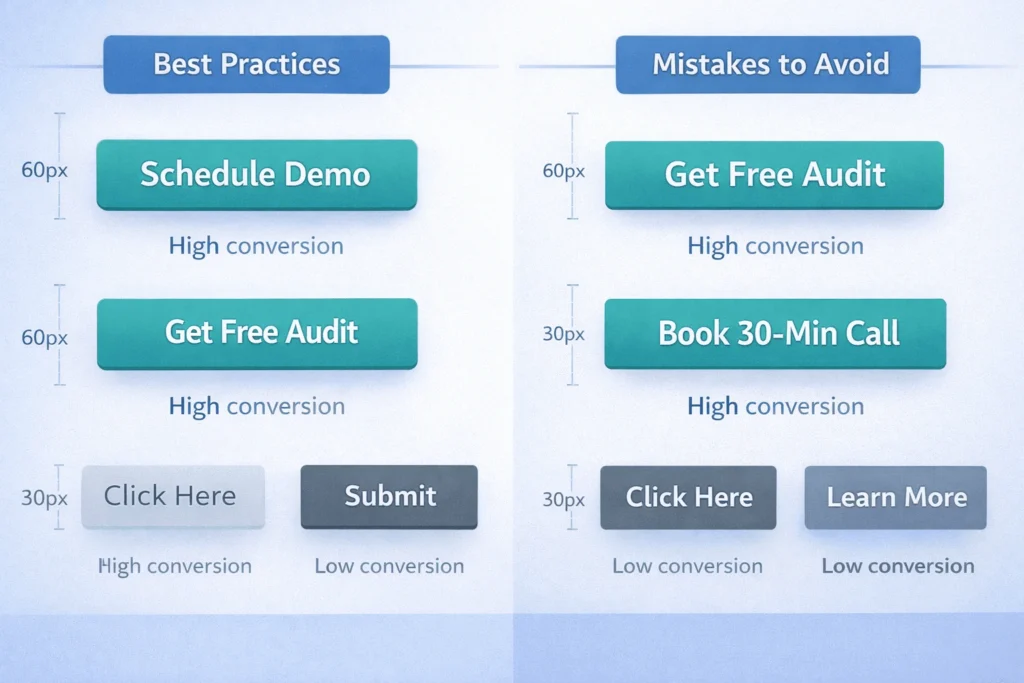
- Action-driven copy – Not “Click Here” but “Schedule Demo,” “Get Free Audit,” “Join 500+ Founders”
- Strategic placement – Hero section (above fold) + end of key sections + sidebar/sticky button
- Sized appropriately – Desktop: 50-60px tall, Mobile: 44px+ diameter
- Tested frequently – A/B test button text, color, and placement monthly
Avoid: “Click here,” “Learn more,” “Submit” (generic, low-converting)
Use: “Get Free Audit,” “Book 30-Min Demo,” “See Pricing,” “Join 500+ Teams” (specific, benefit-driven)
7. Trust-Building Elements (Investors need proof you’re credible)
Startups lack track record. Use trust signals to compensate:
Essential trust elements:
- Client logos (even 3-4 recognizable company names boost credibility)
- Customer testimonials with photos + name + role (real faces > anonymous quotes)
- Founder photo + bio (humanizes your brand, builds connection)
- Security badges (SSL certificate green lock, privacy policy, terms of service)
- Social proof (“Used by 500+ companies,” “4.8★ rating,” “Featured in TechCrunch”)
- Awards or certifications (Y Combinator batch, ISO certification, industry awards)
Research insight: According to CXL Institute, trust signals can increase conversions by up to 42%.
8. SEO Fundamentals Built Into Design (Investors Google you before meeting)
Your site needs organic visibility. Even if you’re pre-launch, SEO foundation matters.
SEO checklist items:
- H1 tag – One per page, includes your primary keyword
- Meta titles & descriptions – 55 chars and 155 chars respectively
- Internal linking – Link related pages (boosts SEO + guides users)
- Mobile indexing-friendly – No hidden content on mobile
- Schema markup – Add Organization schema (name, logo, contact info)
- Sitemap + robots.txt – Help Google crawl efficiently
Quick implementation: Use Yoast SEO (WordPress) or RankMath (WordPress/Webflow) to auto-generate meta tags and check on-page SEO.
9. Fast-Loading Images (Every Image Should Serve a Purpose)
Images slow sites down. Most startups use 2-5MB images when they should use 50-150KB.
Image optimization checklist:
- File format – Use WebP for photos, SVG for icons (75% smaller than PNG)
- Compression – Use TinyPNG or Optimizilla (lossy compression is fine for web)
- Dimensions – Resize images to display size (don’t upload 4000px image for 400px display)
- Lazy loading – Load below-the-fold images only when user scrolls there
- Alt text – Every image needs descriptive alt text (SEO + accessibility)
Tool: https://compressor.io or https://tinypng.com
10. Content Clarity (Avoid walls of text—use visual breaks)
Startup founders often over-explain. Visitors scan, they don’t read.
Content best practices:
- Short paragraphs (2-4 sentences maximum)
- Subheadings every 150-200 words (breaks up text visually)
- Bullet lists instead of paragraphs when listing benefits/features
- Action-oriented copy – Lead with the outcome, support with proof
Example:
- ❌ “Our platform uses advanced algorithms to analyze data streams and provide real-time insights across multiple dimensions to help your team make faster decisions.”
- ✅ “See your business metrics in one dashboard. Make decisions 10x faster.”
11. Contact Information Easy to Find (No mystery checkout)
If a potential investor or customer wants to reach you, they should find contact info within 2 clicks.
Checklist:
- Contact info visible in header or footer (email + phone)
- Contact page linked from main navigation
- Contact form includes proper labeling (first name, company, phone)
- Confirmation message after form submission (reduces anxiety)
- Google Business Profile listing matching website info
12. Cross-Browser Compatibility Testing (Works on Chrome, Firefox, Safari, Edge)
Your site should render consistently across browsers.
Testing checklist:
- Test on Chrome, Firefox, Safari, Edge (desktop)
- Test iOS Safari and Chrome Android (mobile browsers differ)
- Check form functionality in all browsers
- Verify CSS renders correctly (sometimes CSS differences appear)
Free tool: https://browsersync.io or use Browserstack
13. Forms That Convert (Not overly long, clear confirmation)
Forms are where leads happen. Poorly designed forms kill leads.
Form optimization:
- Keep to 3-5 fields maximum (more fields = lower completion rates)
- Field labels are clear (not “Company Name” but “Which company do you work for?”)
- Progress indicators (if multi-step form, show step 1 of 3)
- Error messages are helpful (“Email format invalid—use example@company.com“)
- Submission confirmation (page or email confirming receipt)
A/B test: Try 3 fields vs. 5 fields and see which converts higher
14. Analytics Implemented (Track what matters)
If you’re not measuring it, you can’t improve it.
Analytics must-haves:
- Google Analytics 4 installed and tracking conversions
- Goal set up (lead form submission, purchase, email signup)
- Heatmap tool installed (Hotjar or Microsoft Clarity) to see where users click
- UTM parameters in marketing links to track campaign performance
- Monthly review of visitor behavior, bounce rates, and conversion funnel
15. Security & HTTPS Enabled (Investors will check)
No SSL certificate? Visitors see a scary red warning. Startup founders shouldn’t launch unencrypted sites.
Security checklist:
- SSL certificate installed (HTTPS—shown by green lock in browser)
- Privacy policy page (link in footer, 3-5 sentences)
- Terms of service page (required for SaaS)
- Cookie consent banner if using analytics (GDPR compliance)
- Regular backups (your hosting provider should handle this)

Website Design Mistakes That Kill Startup Conversions
Many founders make the same design errors that tank conversion rates:
| Mistake | Why It Kills Conversions | Fix |
|---|---|---|
| Unclear value prop | Visitor doesn’t understand what you do in 10 seconds | Replace “Innovative SaaS Solutions” with “Save 10 hours/week on payroll” |
| Slow load time (>3 sec) | 53% of mobile users bounce | Optimize images, use CDN, compress CSS/JS |
| Weak or hidden CTA | Visitors want to convert but can’t find button | Make CTA button 60px tall, high-contrast color, placed 2-3 times per page |
| Not mobile responsive | 60% of traffic leaves instantly | Use responsive framework (Tailwind, Bootstrap), test on real phone |
| Cluttered design | Cognitive overload—too many choices, colors, sections | Limit to 3-5 colors, remove non-essential elements, whitespace > clutter |
| No trust signals | Investor or customer doesn’t know if you’re legit | Add 3-4 client logos, testimonial with photo, founder bio, security badges |
| Forms too long | Users abandon at form | Keep to 3-5 fields only |
| Broken links | Users hit dead ends, lose trust | Test every link on every page monthly |
How to Create a Website Design Checklist (Step-by-Step Process)
Launching a Startup Website Using a Design Checklist
Times Needed: 7 Days, 16 Hours, 45 Minutes
Estimated Cost: $0–$500 USD (using free tools + optional paid templates)
Description: Complete step-by-step process for startup founders to design, optimize, and launch a conversion-focused website using a comprehensive checklist. Covers research, design, optimization, testing, and launch with actionable checkpoints and free tools.
Steps:
Step 1: Define Your Website Goal and Target Audience (4 hours)
Decide your primary objective (lead generation, sales, or credibility). Research your target audience’s pain points, browsing devices, and decision timeline. Document your goal in one sentence: “Generate 10 qualified B2B leads per month for our SaaS product.”
Step 2: Choose a Website Builder or CMS (2 hours)
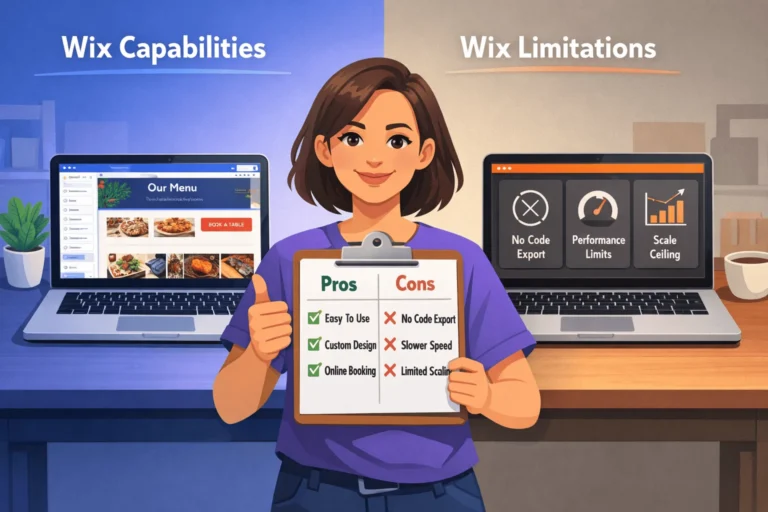
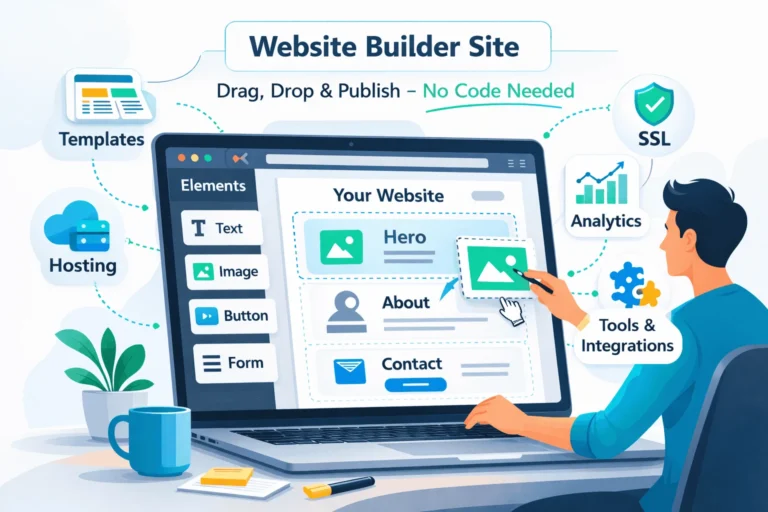
Select your platform: Webflow (design flexibility), WordPress (SEO-friendly), or Wix/Squarespace (beginner-friendly). Choose a startup-focused template that matches your industry. Download or activate the template and customize colors/fonts to match your brand.
Step 3: Build Core Pages and Define Navigation (8 hours)
Create essential pages: Home, Services/Product, About, Blog (optional), Contact. Structure navigation to keep users 2-3 clicks away from any page. Write clear headlines, value propositions, and CTAs for each. Add trust elements: logos, testimonials, founder photo, security badges.
Step 4: Optimize for Mobile and Speed (6 hours)
Test site on iPhone and Android using Chrome DevTools. Compress all images below 100KB using TinyPNG. Enable lazy loading. Install a speed optimization plugin (WP Rocket for WordPress). Run PageSpeed Insights and aim for 80+ score. Fix any horizontal scrolling or button-sizing issues on mobile.
Step 5: Implement SEO and Analytics (4 hours)
Install Google Analytics 4 and Google Search Console. Set up conversion goal tracking (form submission or purchase). Add meta titles, descriptions, and H1 tags to pages. Install Yoast SEO plugin. Create sitemap and submit to Google Search Console. Set up Google Business Profile.
Step 6: Test Forms, Links, and Cross-Browser Compatibility (3 hours)
Test all forms by submitting test data. Verify confirmation messages display. Click every link to ensure none are broken. Test site on Chrome, Firefox, Safari, and Edge. Check on real mobile devices (iPhone, Android). Fix any errors or inconsistencies.
Step 7: Soft Launch, Monitor, and Iterate (ongoing)
Launch to a small audience (email list, social media). Monitor Google Analytics for visitor behavior, bounce rates, and conversion rate. Use Hotjar heatmaps to see where users click. A/B test CTA button text, color, or placement for 2 weeks. Make data-driven improvements weekly.
Tools Name:
- Webflow or WordPress (website platform)
- TinyPNG (image compression)
- Google Analytics + Search Console (analytics and SEO tracking)
Materials Name:
- Brand guidelines document (colors, fonts, logo files)
- Website copy and content (written in advance)
- Client logos and testimonials (with written permission)
Website Design Checklist Comparison Table
Use this table to evaluate your current website against best-in-class standards:
| Design Element | Status | Priority | Estimated Fix Time | Expected Impact on Conversions |
|---|---|---|---|---|
| Mobile responsive | ✓ or ✗ | Critical | 2-4 hours | +30% (from reducing mobile bounces) |
| Page load <3 sec | ✓ or ✗ | Critical | 4-6 hours | +25% (faster = fewer bounces) |
| Clear hero CTA | ✓ or ✗ | Critical | 1-2 hours | +15% (visible CTAs drive action) |
| Trust signals (logos, testimonials) | ✓ or ✗ | High | 3-4 hours | +20% (credibility = conversions) |
| Analytics implemented | ✓ or ✗ | High | 1-2 hours | Enables measurement & optimization |
| SEO fundamentals (meta tags, H1) | ✓ or ✗ | High | 2-3 hours | +10% (from organic search traffic) |
| Form <5 fields | ✓ or ✗ | High | 2-3 hours | +35% (short forms convert better) |
| Clear navigation | ✓ or ✗ | Medium | 2-4 hours | +10% (reduced frustration) |
| Image optimization | ✓ or ✗ | Medium | 4-6 hours | +15% (faster load time) |
| Contact info accessible | ✓ or ✗ | Medium | 1 hour | Enables investor/customer outreach |
FAQ: Website Design for Startups
How much should a startup spend on website design?
Depends on your stage:
Pre-seed: $0–$500 (use template + builder like Webflow/Wix)
Seed: $2,000–$10,000 (hire freelancer or small agency)
Series A: $15,000–$50,000+ (custom design + build)
The ROI matters more than the spend. A $500 template site that converts 3% of visitors outperforms a $50K custom site with 0.5% conversion.
Can I use a template or do I need custom design?
Templates are fine for startups. Most successful startups use frameworks like:
Webflow (design flexibility + no coding)
WordPress themes (cost-effective, customizable)
Wix/Squarespace (beginner-friendly, all-in-one)
Custom design matters when you’re Series A+ with a large budget. Pre-seed? Template + quality copy beats custom design.
How do I know if my website design is working?
Track these metrics monthly:
Bounce rate (target: <60% for startup sites)
Conversion rate (lead form submission, sales)
Pages per session (target: 2+ pages)
Average session duration (target: 1.5+ minutes)
Mobile vs. desktop conversion rate (should be similar—if mobile is 50% lower, fix mobile UX)
Use Google Analytics to monitor.
Should my startup website have a blog?
Not immediately. Focus on core pages first (Home, Services, About, Contact). Add a blog after launch if you have time/resources. Blog serves SEO and thought leadership, not immediate lead generation.
What’s the most common website design mistake startups make?
Unclear value proposition. Most startup homepages say “Innovative Solutions for Modern Challenges” instead of “Save your team 10 hours per week.”
Visitors have 10 seconds. Use them wisely. Clear > Creative.
How often should I redesign my website?
Don’t redesign. Iterate.
Month 1-3: Collect data (analytics, form submissions, user feedback)
Month 3-6: Test changes (CTA color, copy variations, form length)
Month 6+: Scale what works
Major redesign only after 6+ months of data or significant business pivot.
Do I need a professional copywriter?
Ideally yes, but optional for pre-seed startups. At minimum:
Hire a freelancer for $500–$1,500 to write homepage + key pages
Use AI tools (ChatGPT) to draft copy, then edit heavily
Have a technical co-founder or marketer refine the copy
Good copy > Good design. Invest in words first.
What’s the fastest way to get a site live?
Pick a template (Webflow, WordPress, Wix)
Customize in 2-3 hours (logo, colors, basic copy)
Launch it (don’t wait for perfection)
Iterate based on user data for 3-6 months
Speed to market beats perfection. Launch in 1 week, not 3 months
Key Takeaways
- Website design isn’t about aesthetics—it’s about converting visitors into leads, customers, or investor interest. Every design decision should align with this goal.
- Mobile matters more than desktop. 60% of traffic comes from phones. If your site doesn’t work on mobile, you’ve lost half your visitors.
- Page speed kills conversions. Every 1-second delay reduces conversions by 7%. Optimize images, use a CDN, and aim for <3-second load times.
- Clear value proposition beats creative ambiguity. Users decide in 10-20 seconds if your site is relevant. Tell them exactly what you do and why they should care.
- Trust signals are worth money. Client logos, testimonials with photos, founder bios, and security badges increase conversions by up to 42%.
- Weak CTAs are invisible CTAs. Make buttons large, high-contrast, action-driven, and place them 2-3 times per page.
- A/B testing compounds improvements. Test button colors, form length, headline variations. Small wins add up to 30%+ conversion lifts over 6 months.
- Analytics are non-negotiable. If you’re not measuring, you’re guessing. Install Google Analytics and track: bounce rate, conversion rate, pages per session.
- Don’t wait for perfection. Launch your site in 1-2 weeks using a template, then iterate based on user data. Perfection in 3 months loses to “good enough” launched today.
- Hire help strategically. You don’t need a $50K custom design agency pre-seed. Use a $500 template + $1,500 copywriter, and you’re 90% of the way there.
Next Steps
Ready to audit or redesign your startup website? Here’s what to do now:
- Take the 15-point checklist above and score your current website (✓ or ✗ for each item). Count your checkmarks—if you’re below 10/15, prioritize fixes.
- Set up Google Analytics and Google Search Console (if not already done). Start measuring visitor behavior and conversion rates. You can’t improve what you don’t measure.
- A/B test one element this week: CTA button color, headline variation, or form length. Small tests generate big learning fast.
- Learn WordPress website design by reading our complete guide to WordPress website design in 2026 (designed for founders with no coding experience).
- Book a free website audit with StartupMandi to get personalized recommendations for your specific startup. Our team will review your site against best practices and identify your highest-impact opportunities.
Conclusion
A startup website is one of your most valuable assets, yet most founders treat it as an afterthought. They focus on product, forget about design.
But here’s the reality: Investors will visit your website. Customers will judge you by it. Every dollar spent on design ROI compounds over time.
The good news? You don’t need a $50K custom website to convert. You need a systematic approach using this 15-point checklist, data-driven iteration, and clear focus on conversion.
Start with the basics: mobile responsiveness, clear value prop, fast load times, prominent CTAs, and trust signals. Launch in 1-2 weeks using a template. Then measure, iterate, and improve.
Get your free website audit today and see exactly where your site is losing conversions. Our experts will identify your top 3 fixes and estimated impact on lead generation.
Follow StartupMandi for more founder-focused guides on product-market fit, fundraising, and go-to-market strategy. We’re committed to helping startups build not just products, but sustainable, scalable businesses.
Resources for Startup Website Design
Website Builders & CMS Platforms:
- Webflow – No-code design platform with full customization
- WordPress.org – Open-source, SEO-friendly, highly customizable
- Wix – Beginner-friendly all-in-one builder
Analytics & Measurement:
- Google Analytics 4 – Free visitor behavior tracking
- Hotjar – Heatmaps and session recordings (understands how users interact)
- Google Search Console – SEO and traffic insights
Design & Optimization Tools:
- TinyPNG – Image compression for faster load times
- Google PageSpeed Insights – Speed and performance analysis
- Yoast SEO – On-page SEO optimization
Copywriting & CTA Resources:
- ConvertKit – Email + landing pages for creators
- Unbounce – A/B testing platform for conversion optimization
- CXL Institute – Advanced conversion rate optimization training
About StartupMandi
StartupMandi is India’s leading startup knowledge platform, helping founders, early-stage teams, and entrepreneurs build scalable, profitable businesses. We specialize in:
- Free website audits for startups (identify your top conversion opportunities)
- Custom website development (from template to fully custom design)
- WordPress training for founders building their own sites
- Conversion optimization consulting (data-driven strategies to increase leads/sales)
- Founder resources on fundraising, product-market fit, and go-to-market strategy
Book your free website audit — No credit card required. Our team will review your site, identify 3-5 high-impact opportunities, and show you exactly where your conversions are leaking.