
Are you curious about launching a career in UI/UX design but unsure where to start? A UI UX design course teaches you the strategic and creative skills to build digital products that users genuinely love. Whether you’re a creative student or aspiring designer, understanding what these courses cover—from user research to prototyping to visual design—is your first step toward a thriving design career.
Also read: Google Data Analytics Professional Certificate: Is It Worth It in 2026?
How It Differs from Graphic or Web Design
While Graphic Design focuses on visual communication (static images and branding) and Web Design often focuses on coding and layout, UI/UX design focuses on the entire user journey. It is less about how a button looks and more about why a user clicks it and how they feel afterward.
What Is a UI/UX Design Course, really?
A UI/UX design course is a structured learning program that teaches you to design user-centered digital products—from websites and mobile apps to dashboards and software platforms. These courses blend strategic thinking with hands-on creative skills, equipping you to solve real user problems through thoughtful design.
What to Expect: Skills, Tools, and Outcomes
A comprehensive course typically covers the full product development lifecycle:
- Skills & Tools: You will master User Research and Wireframing before moving into high-fidelity prototyping. You’ll become proficient in industry-standard tools like Figma, Adobe XD, and Sketch, while learning soft skills like empathy mapping and usability testing.
- Who It’s For: This is ideal for creative problem-solvers, career-switchers from tech or arts, and developers who want to understand the “human side” of software.
- Career Outcomes: Graduates typically land roles as Product Designers, UX Researchers, or Interaction Designers. With the digital boom, these roles are increasingly vital for any company with a digital footprint.
This guide focuses specifically on the Indian design ecosystem. With the “Digital India” initiative and the massive rise of startups in Bengaluru, Gurgaon, and Mumbai, there is a surging demand for localized design expertise. Indian UI/UX courses often emphasize mobile-first design to cater to the country’s smartphone-heavy user base, preparing you for a high-growth career in one of the world’s fastest-evolving digital markets. By the end, you’ll have built a professional portfolio of real-world design projects that demonstrate your ability to think strategically about user needs.
Key elements typically covered in these courses include:
- Design thinking and problem-solving frameworks
- User research methodologies and data analysis
- Wireframing and low-fidelity prototyping
- High-fidelity design and visual systems
- Interaction design and micro-interactions
- Prototyping and usability testing
- Design tools proficiency (Figma, Adobe XD, Sketch)
- Responsive and mobile-first design principles
- Accessibility and inclusive design standards
These courses range from 3-6 month bootcamp-style programs to university-level specializations spanning 6-12 months. Some are self-paced online courses, while others offer instructor-led formats with real-time feedback and mentorship.
UI vs. UX Design: Understanding the Critical Difference
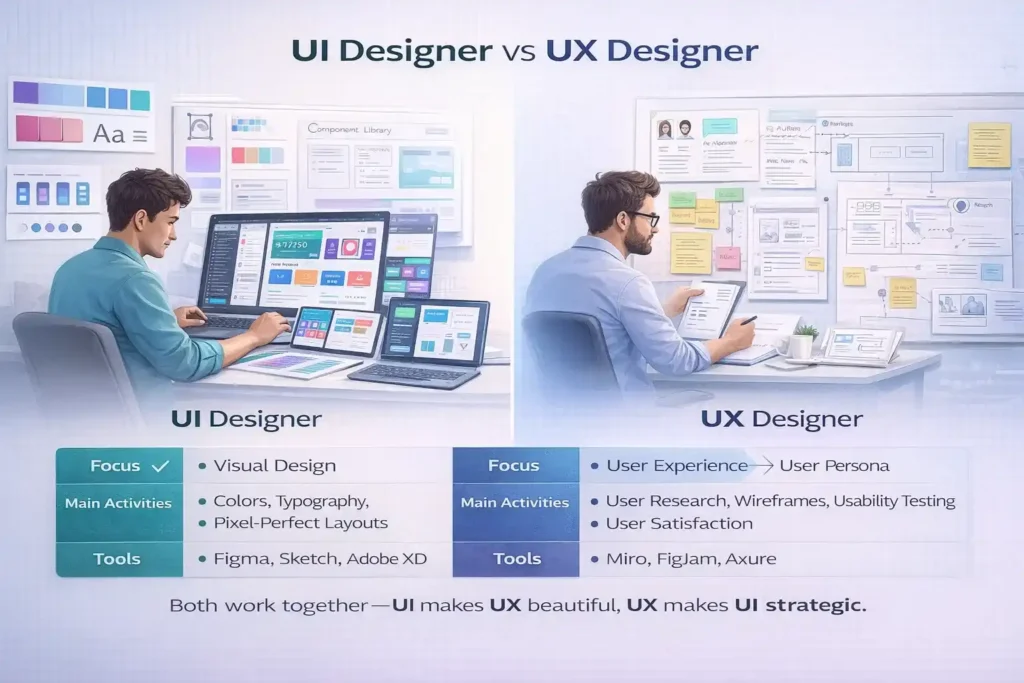
One of the most important distinctions in your UI/UX design course will be understanding how UI (User Interface) and UX (User Experience) are different yet complementary roles.
Think of it this way: If UX design is the flight path, UI design is the runway lighting. It tells you you’re in the right place.
What Does a UX Designer Do?
UX designers focus on how the product works and feels to the user. They’re researchers, strategists, and problem-solvers who investigate real user needs before any visual design happens.
Typical UX designer responsibilities include:
- Conducting user research through interviews, surveys, and observation
- Creating user personas and empathy maps to understand target audiences
- Building user journey maps to visualize the complete experience
- Designing wireframes and low-fidelity prototypes
- Performing usability testing and gathering feedback
- Iterating designs based on real user data
- Defining information architecture and user flows
- Ensuring accessibility and inclusive design principles
A real-world example: A UX designer researching an e-commerce app discovers that users abandon checkout because the payment form has 12 required fields. The UX designer simplifies the flow, tests it with users, and confirms conversion rates increase by 30%. The UI designer then makes that simplified form visually beautiful and on-brand.
Key UX skills to master: User research, wireframing, prototyping, interaction design, information architecture, usability testing, data analysis, and problem-solving.
What Does a UI Designer Do?
UI designers focus on how the product looks and feels—the visual language. They’re visual communicators who translate UX strategies into polished, intuitive interfaces that users enjoy.
Typical UI designer responsibilities include:
- Designing visual hierarchies and interface layouts
- Selecting color schemes, typography, and visual styles
- Creating design systems and component libraries
- Designing interactive elements (buttons, menus, forms, animations)
- Ensuring consistency across all screens and devices
- Creating micro-interactions and feedback states
- Collaborating with developers on design handoff
- Maintaining brand identity across the product
A real-world example:
- Fintech: Think of PhonePe or Google Pay. Their UX success lies in making complex UPI transactions feel like a simple chat interface, building trust through instant haptic feedback.
- Food Delivery: Apps like Zomato and Swiggy use “persuasive design”—high-quality food imagery (UI) combined with real-time GPS tracking (UX) to reduce “hunger anxiety.”
- EdTech: Platforms like Unacademy or BYJU’S use gamification (badges and progress bars) to keep students engaged in a country where digital learning is a primary path to career success.
Key UI skills to master: Visual design, typography, color theory, layout and spacing, design systems, interaction design, prototyping in design tools, and responsive design.
How UI and UX Work Together
The most successful digital products result from seamless collaboration between UI and UX designers. Both stare at the same Figma file but handle different layers—UX ensures the experience logic is sound, while UI ensures every interaction delights users visually.
| Aspect | UX Designer | UI Designer |
|---|---|---|
| Primary Focus | How the product works and feels | How the product looks and functions visually |
| Key Activities | User research, wireframing, testing | Visual design, interaction design, design systems |
| Main Goal | Solve user problems, improve usability | Create beautiful, consistent, intuitive interfaces |
| Success Metric | Task completion rates, user satisfaction | Visual consistency, reduced cognitive load, trust |
| Tools Used | Figma, Sketch, Adobe XD, user testing platforms | Figma, Adobe XD, Sketch, design systems tools |
| Mindset | Data-driven, empathetic, analytical | Creative, visual, detail-oriented |
Core Skills Every UI/UX Designer Needs
A strong UI/UX design course teaches you a mix of hard technical skills and soft human-centered skills. Mastering both sets you apart in a competitive job market.
Hard Skills (Technical Competencies)
1. User Research and Analysis
Understanding user behavior is foundational to design. You’ll learn to conduct interviews, surveys, usability tests, and interpret analytics data to make informed design decisions. This research uncovers real pain points, not imagined ones.
2. Wireframing and Prototyping
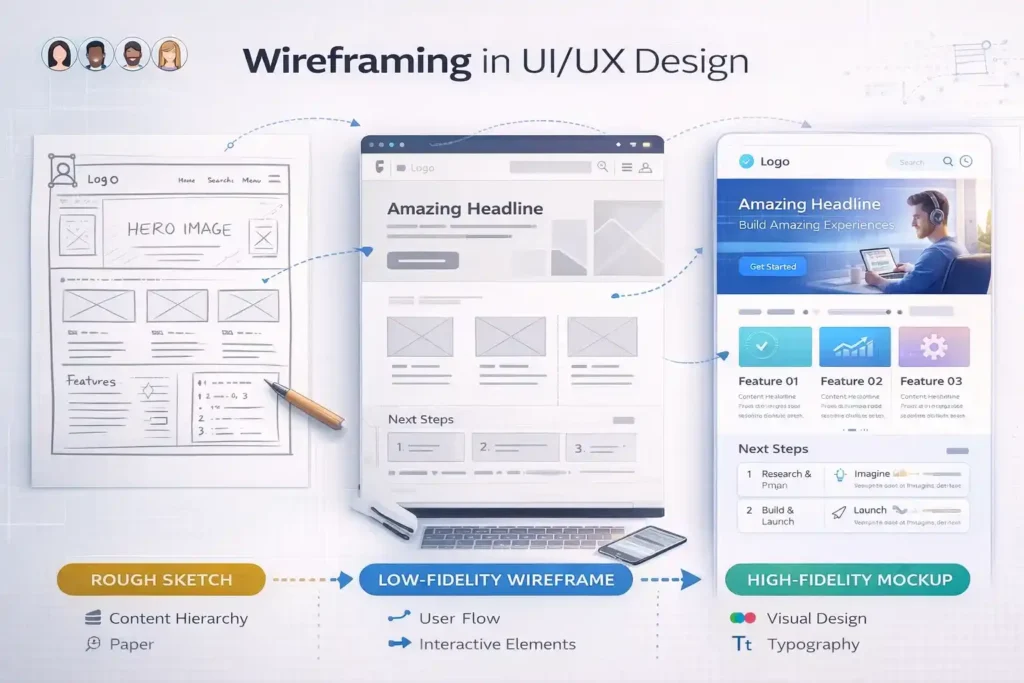
Wireframes are low-fidelity blueprints that focus on layout and structure without visual distraction. You’ll create wireframes to rapidly explore multiple design solutions before investing in high-fidelity work. Prototypes bring wireframes to life with interaction, allowing users to test your designs.
3. Visual Design and Design Systems
You’ll master color theory, typography, layout principles, spacing, and visual hierarchy. Modern UI/UX designers also create design systems—reusable components and patterns that ensure consistency across products and scale design work efficiently.
4. Interaction Design
This involves designing how users interact with every element—buttons, forms, animations, transitions, and feedback. Good interaction design makes interfaces feel responsive and intuitive, reducing user confusion.
5. Information Architecture (IA)
IA is the art of organizing and structuring content logically. You’ll learn card sorting techniques, create user flows and task flows, and build sitemaps that help users find what they need intuitively.
6. Accessibility and Inclusive Design
Modern courses emphasize designing for all users, including those with disabilities. You’ll learn WCAG guidelines, color contrast standards, keyboard navigation, and screen reader compatibility—ensuring your designs work for everyone.
7. Design Tool Proficiency
Professional UI/UX courses teach industry-standard tools where you’ll spend 30-40% of your learning time:
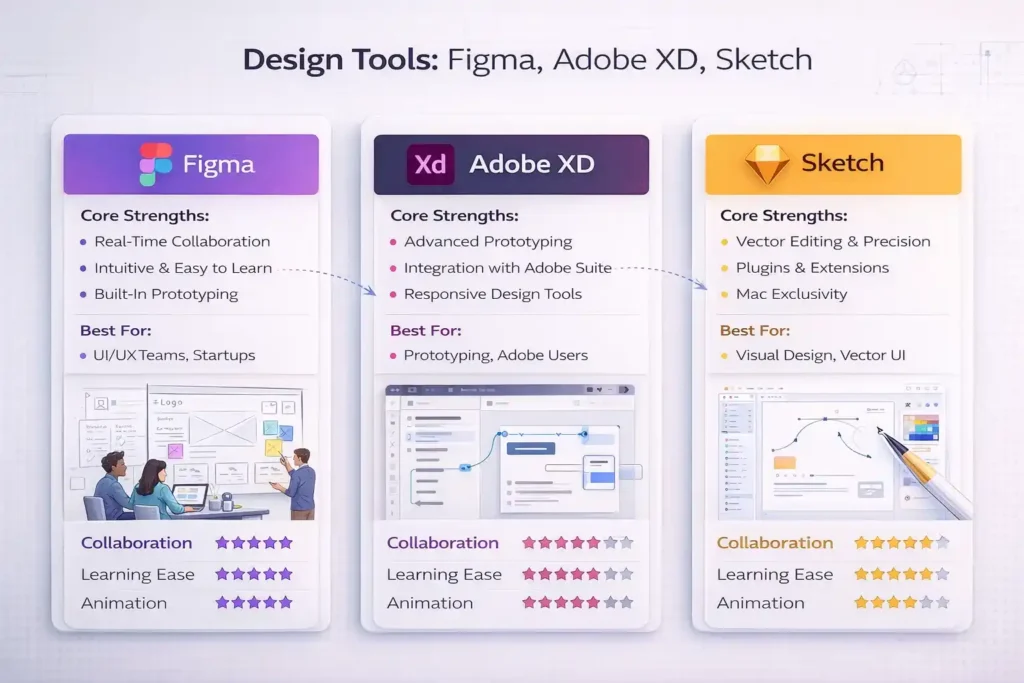
- Figma (cloud-based, collaborative, rising standard)
- Adobe XD (powerful prototyping, animation capabilities)
- Sketch (vector design, plugin ecosystem)
- InVision (advanced prototyping and user testing)
8. Responsive and Mobile-First Design
You’ll design interfaces that work beautifully on phones, tablets, and desktops. The “mobile-first” approach means starting with small screens and expanding to larger ones—ensuring core functionality works everywhere.
Soft Skills (Human-Centered Competencies)
Communication and Empathy: Present design decisions to stakeholders, explain your reasoning, and listen actively to feedback. Empathy means genuinely understanding user needs and perspectives, not just your own design preferences.
Problem-Solving and Critical Thinking: Great designers ask the right questions before jumping to solutions. You’ll learn frameworks like Design Thinking to approach complex problems systematically.
Collaboration and Teamwork: UI/UX designers work with developers, product managers, marketers, and other designers. Being a good collaborator means compromising, sharing credit, and building cohesive solutions together.
Attention to Detail: Pixel-perfect design matters. Small details—button sizes, spacing, micro-interactions—accumulate to create excellent user experiences.
Adaptability and Resilience: Design involves iteration and feedback. You’ll learn to embrace critique, pivot when needed, and stay motivated through multiple rounds of refinement.
“The best design is invisible. It doesn’t get in the user’s way; instead, it helps users accomplish their goals effortlessly.” – This philosophy underpins everything taught in modern UI/UX courses.
Design Tools You’ll Master
Your UI/UX design course will focus heavily on design tools. Here’s what industry leaders require:
Figma: The Collaborative Cloud Standard
Figma dominates modern design workflows due to its cloud-based architecture and real-time collaboration. Multiple designers can work on the same file simultaneously, commenting and iterating in real-time.
Key features UI/UX courses emphasize:
- Auto Layout for responsive design (adjusts elements automatically based on rules)
- Component libraries and design systems
- Prototyping with interactive flows
- Developer handoff with automated code specifications
- Plugin ecosystem extending functionality
- Works on any device with a browser
Figma’s learning curve is gentle, making it ideal for beginners, yet powerful enough for enterprise design systems.
Adobe XD: Advanced Interactions and Animation
Adobe XD excels at high-fidelity prototyping with sophisticated interaction capabilities. If you’re designing complex animations and 3D transformations, Adobe XD offers depth that Figma is still catching up on.
Key features courses highlight:
- Repeat Grid for duplicating elements rapidly
- Advanced prototyping with conditional logic
- 3D transforms and perspective effects
- Responsive resize for mobile-first design
- Seamless integration with Adobe’s Creative Suite (Photoshop, Illustrator)
- Rich interaction capabilities for complex flows
Adobe XD suits designers coming from Adobe’s ecosystem or those needing advanced animation control.
Sketch: Vector Design and Plugin Ecosystem
Sketch has been the industry standard for visual UI design for years, though Figma is gaining market share. Sketch excels at vector illustration and has a mature plugin ecosystem.
Why courses still teach Sketch:
- Exceptional vector editing capabilities
- Massive third-party plugin library
- Strong focus on UI component design
- Popular among established design agencies
- Excellent for illustration and complex vector work
Comparison for Beginners
| Tool | Best For | Learning Ease | Collaboration | Cost |
|---|---|---|---|---|
| Figma | General UI/UX, responsive design, teams | Easy (cloud-based) | Excellent (real-time) | Free tier available |
| Adobe XD | Advanced prototyping, animations, complex interactions | Moderate | Good | Subscription (Adobe suite) |
| Sketch | Visual design, illustrations, component systems | Moderate | Limited (plugins needed) | One-time purchase |
Pro tip: Most UI/UX courses teach Figma as the primary tool with supplementary lessons in Adobe XD. This gives you the broadest market advantage.
The UI/UX Design Process: From Research to Launch
Understanding the design thinking process is central to any quality UI/UX design course. This human-centered methodology guides how professionals approach problems.
Stage 1: Empathize (User Research)
The empathy phase removes guesswork. Before designing anything, you research real users through:
- User interviews: Deep conversations to understand needs, behaviors, and frustrations
- Surveys and questionnaires: Quantify patterns across larger audiences
- Observation: Watch users interact with existing products or competitors
- Analytics review: Analyze data on how users currently behave
- Contextual inquiry: Observe users in their natural environment
From this research, you create user personas—semi-fictional representations of your target audience with names, goals, pain points, and behaviors. These personas guide every design decision moving forward.
Stage 2: Define (Problem Statement)
Synthesize research into a clear problem. Rather than assuming you know the issue, you articulate it based on data.
Example problem statement: “Freelance designers need a faster way to organize project files and share work with clients because current solutions require too many clicks and context-switching between tools.”
You also create empathy maps showing what users think, feel, say, and do—deepening understanding beyond surface-level requirements.
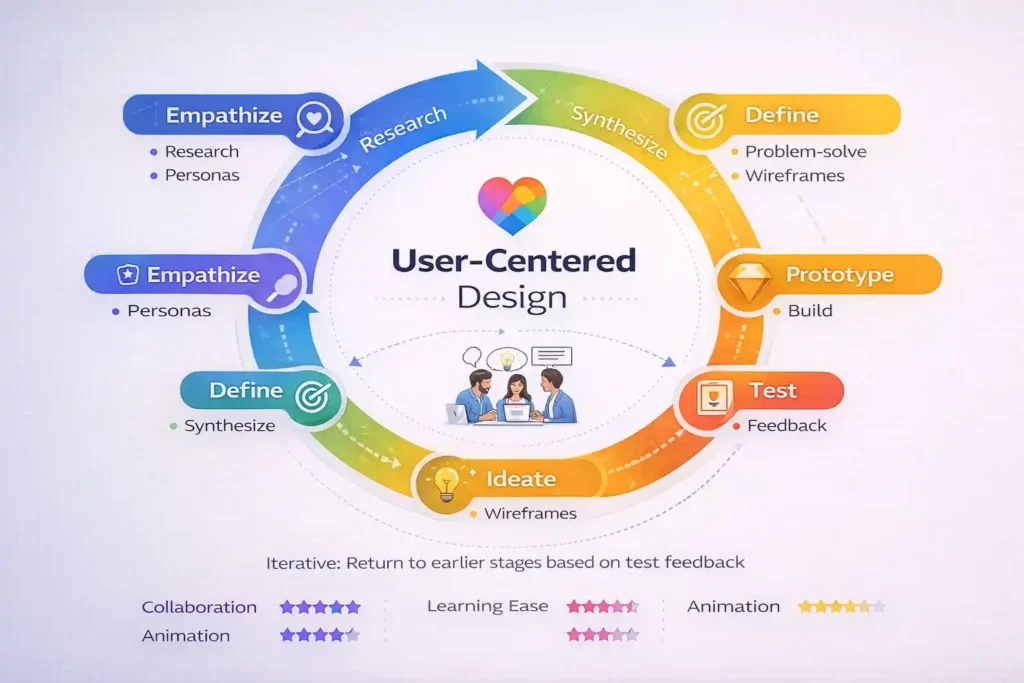
Stage 3: Ideate (Brainstorm Solutions)
Generate multiple solutions before committing to one. Techniques include:
- Brainstorming sessions with your design team
- Crazy Eights (sketching 8 ideas in 8 minutes)
- Mind mapping to explore problem dimensions
- Competitive analysis to learn what competitors do well
The goal is quantity over quality—generate 20 ideas before evaluating them. This prevents groupthink and uncovers creative directions you might have otherwise missed.
Stage 4: Prototype (Build Tangible Solutions)
Create tangible representations of your ideas. Start with low-fidelity prototypes—sketches or wireframes focusing on layout and flow rather than visual polish.
Then move to high-fidelity prototypes in tools like Figma, adding color, typography, real content, and interactions. Prototyping forces you to think through details that aren’t obvious in concept sketches.
Stage 5: Test and Refine (Get User Feedback)
Put prototypes in front of real users through usability testing. Watch users interact with your design, listen to their feedback, and identify friction points.
Common testing methods include:
- Moderated user testing (you’re present, ask follow-up questions)
- Unmoderated remote testing (users complete tasks independently)
- A/B testing (compare two design variations)
- Accessibility testing (ensure inclusive design)
Based on feedback, iterate—refine your design and test again. This cycle repeats until you achieve your success metrics (task completion rates, user satisfaction, conversion improvements).
“The best ideas come from deeply understanding your users, not from brainstorming in a conference room.” – This principle shapes every step of the design thinking process.
Industry Tools and Design Systems
Modern UI/UX design courses increasingly emphasize design systems—collections of reusable components, patterns, and guidelines that scale design work.
What Are Design Systems?
A design system documents how to build consistent user interfaces. Think of it as a codified version of “how we design here.”
Components of a design system include:
- Color palettes with accessible contrast ratios
- Typography scales (font families, sizes, weights, line heights)
- Spacing systems (usually 4px, 8px, or 16px base units)
- Button styles, input fields, cards, and other UI components
- Icon sets and imagery guidelines
- Motion and animation principles
- Accessibility standards and testing guidelines
- Usage documentation and examples
Why design systems matter: They ensure consistency across products, speed up design work (reuse instead of rebuilding), maintain brand identity, and make collaboration between designers and developers smoother.
Popular Design Systems
Your UI/UX course might reference real-world design systems:
- Material Design (Google’s system for Android and web)
- Human Interface Guidelines (Apple’s system for iOS and macOS)
- Carbon Design System (IBM’s enterprise design system)
- Ant Design (Enterprise UI library)
Learning to build and document design systems is increasingly expected of professional UI/UX designers, especially for mid-level and senior roles.
UI/UX Design Skills in Practice: Real-World Examples
Example 1: Redesigning a Checkout Flow
The Problem: An e-commerce site has a high checkout abandonment rate (70% of users who add items don’t complete purchase).
UX Designer’s Approach:
- Interviews users who abandoned carts—discovers they’re confused by the multi-step form
- Creates wireframes testing a single-page checkout instead
- Usability tests the new design—task completion improves from 30% to 85%
UI Designer’s Work:
- Applies color psychology (green for “proceed,” red avoided)
- Designs clear progress indicators
- Creates reassuring micro-interactions (checkmark animations when fields complete)
- Ensures the form works on mobile (where 60% of abandonment occurs)
Result: Conversion rate increases 40%, generating millions in additional revenue annually.
Example 2: Designing for Accessibility
The Challenge: A financial app works for sighted users but fails for blind users relying on screen readers.
Course Content: UI/UX students learn accessibility from day one—not as an afterthought.
What They Apply:
- WCAG 2.1 AA color contrast standards (4.5:1 for text)
- Semantic HTML structure allowing screen reader navigation
- Focus indicators visible to keyboard-only users
- Alternative text for all images describing purpose, not just “image”
- Audio descriptions for video content
Impact: The app now serves all users, expands market reach, and demonstrates inclusive design values.
Career Paths After Your UI/UX Design Course
Career Opportunities and Growth
The UI/UX design job market is booming. Market research shows the UI/UX design market is expected to grow from USD 2.20 billion in 2025 to USD 11.66 billion by 2031, with compound annual growth exceeding 30%.
More importantly, demand for experienced designers outstrips supply by up to 4 times in major tech hubs. This means your skills are in high demand globally.
Entry-Level Roles
Junior UI/UX Designer (typically after bootcamp/course completion):
- Starting salary: ₹1.2 Lakhs to ₹8 Lakhs per annum (India) / $78,961 annually (US)
- Responsibilities: Assist in user research, create wireframes and mockups, participate in usability testing
- Time to next level: 1-2 years
Growth trajectory: With a strong portfolio and real project experience, junior designers progress to mid-level positions relatively quickly.
Mid-Level Roles
Mid-Level UX Designer (2-5 years experience):
- Salary: ₹3 Lakhs to ₹18 Lakhs (India) / $124,415 annually (US)
- Lead user research and strategy, own complete product redesigns, mentor junior designers
Senior UI Designer (3-7 years experience):
- Salary: ₹3.6 Lakhs to ₹25.4 Lakhs (India) / $129,828 annually (US)
- Establish visual systems, ensure brand consistency across products, lead design direction
Senior and Leadership Roles
UX Design Manager / Design Lead (5+ years):
- Salary: ₹15 Lakhs to ₹56 Lakhs (India) / $171,884 annually (US)
- Lead design teams, set strategy, influence product roadmap
Product Designer (hybrid role combining UX research, UI design, interaction design):
- One of the most in-demand roles in 2026
- Salary: ₹10 Lakhs to ₹40 Lakhs (India) / $140,000+ annually (US)
- Own complete product areas, drive business impact
Specialized Roles Emerging in 2026
- UX Researcher: Focus on user research and data analysis (high demand, fewer qualified candidates)
- Interaction Designer: Specialize in motion, animation, and micro-interactions
- Accessibility Designer: Ensure inclusive design across products
- AR/VR Interface Designer: Emerging field with premium salaries (specialists command 20-30% premiums)
- Design Systems Specialist: Build and maintain design systems for large organizations
How to Choose the Right UI/UX Design Course
Key Factors to Consider
1. Curriculum Depth
Does the course cover user research, wireframing, visual design, prototyping, and testing? Or just the design tools? Comprehensive courses teach the entire design thinking process.
2. Tool Coverage
Ensure the course teaches Figma (essential in 2025-2026) plus at least one of Adobe XD or Sketch. Tool-only courses are insufficient.
3. Portfolio Building
The best courses guide you through 3-5 real-world projects you can add to a professional portfolio. This matters more than certifications when job hunting.
4. Mentorship and Feedback
Live instructor feedback on your work is invaluable. Purely recorded courses lack this personalization.
5. Job Placement Support
Some courses offer job placement assistance, resume reviews, and alumni networks—increasing your hiring probability significantly.
6. Duration and Format
- Bootcamp format (3-4 months, intensive): Fast but demanding
- Part-time course (6 months, evenings/weekends): Fits working professionals
- University specialization (6-12 months): More academic depth but slower progression
7. Cost-Benefit Analysis
Courses range from ₹50,000 to ₹5,00,000 (India) or $1,000 to $15,000 (US). Consider your current salary, target salary increase, and time investment before committing.
How To: Launch Your UI/UX Design Career
Times Needed: 90-120 Days to complete foundational skills, 180-240 Days to build portfolio
Estimated Cost: ₹50,000-2,00,000 (INR) / $1,000-5,000 (USD) for quality courses
Description: A complete roadmap to transition from beginner to job-ready UI/UX designer through structured learning and portfolio building.
Steps:
Step 1: Learn Design Fundamentals (Weeks 1-2)
Complete 1-2 foundational courses covering design principles, color theory, typography, and the design thinking process. Focus on understanding why design decisions matter, not just the tools. Duration: 20-30 hours.
Step 2: Master Your First Design Tool (Weeks 3-6)
Deep-dive into Figma through tutorials, design challenges, and hands-on projects. Build 3-5 small projects (redesigning apps, creating mobile screens, building component libraries). Practice daily for 2-3 hours. Duration: 40-60 hours.
Step 3: Understand User Research Methodology (Weeks 7-8)
Learn how to conduct interviews, create personas, build empathy maps, and interpret research data. Take a dedicated course or module on UX research. Practice analyzing real research data. Duration: 15-20 hours.
Step 4: Complete Your First End-to-End Project (Weeks 9-14)
Choose a real problem (redesign an existing app, create a new solution for a market gap). Conduct user research, define the problem, ideate solutions, build wireframes, create high-fidelity mockups, prototype interactions, test with users, and iterate. This project becomes portfolio centerpiece. Duration: 60-80 hours.
Step 5: Build Additional Portfolio Projects (Weeks 15-20)
Complete 2-3 more projects, each showcasing different design challenges (mobile app, dashboard design, design system work). Vary your portfolio to demonstrate range. Document your process with case studies. Duration: 80-100 hours.
Step 6: Study Design Systems and Advanced Topics (Weeks 21-24)
Learn design systems methodology, advanced prototyping, accessibility, and animation. This differentiates you from other junior designers. Duration: 20-30 hours.
Step 7: Build Your Designer Portfolio Website (Weeks 25-26)
Create a professional website showcasing your projects, case studies, and design process. Make it a portfolio piece itself—demonstrate your UI/UX skills through the website design. Include 3-5 best projects with detailed process explanations.
Step 8: Network and Apply (Weeks 27-30)
Connect with designers on LinkedIn, join design communities (Designer Hangout, ADPList, local design meetups), attend design conferences or webinars. Apply to 20-30 junior designer positions, internships, or freelance opportunities. Customize your portfolio for each application.
Tools You’ll Need:
- Figma (free tier sufficient to start)
- Adobe XD or Sketch (free trials available)
- Figma or framer for portfolio website
Materials & Resources:
- Design thinking framework (Stanford’s d.school model)
- User research toolkit (templates for interviews, surveys)
- Accessibility guidelines (WCAG 2.1 standards)
Frequently Asked Questions
Do I need a design background to take a UI/UX design course?
No. Most quality courses accept complete beginners. You need curiosity, willingness to learn, and strong problem-solving skills—not prior design experience.
How long does a UI/UX design course typically take?
Bootcamp-style intensive courses take 3-4 months (60-80 hours). Part-time courses span 6 months (10-15 hours weekly). University specializations take 6-12 months. Self-paced learning varies by individual.
What’s more important: the course certificate or the portfolio?
Portfolio matters infinitely more. Employers hire based on work samples, not certificates. Focus on building 3-5 impressive projects you can show during interviews.
Can I learn UI/UX design for free?
Partially. Free resources (YouTube tutorials, Figma’s learning library, design blogs) teach tools and basics. However, structured guidance from a course accelerates learning and helps you avoid common mistakes. Investing ₹50,000-2,00,000 typically saves 6-12 months of wasted learning.
What’s the difference between UI/UX designer and UX designer?
UX designers focus on research, strategy, and user flows. UI designers focus on visual design and interface polish. Many professionals work as “UI/UX designers” doing both, but pure UX researcher roles are becoming more specialized and command premium salaries.
Do UI/UX designers need to code?
Not mandatory, but understanding HTML, CSS, and JavaScript (basics) helps you collaborate better with developers and create more realistic prototypes. Many courses include optional coding modules.
What tools should I learn first: Figma, Adobe XD, or Sketch?
Learn Figma first (it’s the current industry standard and most intuitive). Once comfortable with Figma, learning Adobe XD takes 2-3 weeks since core concepts transfer. Sketch is increasingly optional for new designers unless targeting specific agencies.
Can I get a UI/UX job after a 3-month bootcamp?
Yes, if you’ve built a strong portfolio during the bootcamp. Entry-level positions exist for designers with proven project work. However, some senior positions still prefer 2+ years of experience.
Is the UI/UX job market saturated in 2025-2026?
Demand exceeds supply. While more people are learning UI/UX, only 10-15% reach professional standards. High-quality designers with strong portfolios face zero competition for roles.
What soft skills matter as much as design skills?
Communication, empathy, problem-solving, collaboration, and resilience. You’ll present designs to non-designers, defend decisions based on user research, and iterate based on feedback. Hard skills get you interviews; soft skills keep you hired and promoted.
Can I work as a freelance UI/UX designer right after a course?
You can start freelancing immediately on platforms like Upwork, Fiverr, and Toptal. However, expect lower rates initially (₹5,000-15,000 per project). Build portfolio pieces first, then charge premium rates (₹50,000+ per project) after 2-3 years of experience.
What’s the career growth potential in UI/UX design?
Excellent. From junior designer (₹1.2L-8L) → mid-level (₹3L-18L) → senior (₹3.6L-25L) → lead/manager (₹15L-56L+). Experienced designers command high rates as freelancers or consultants. Some transition to product management, design leadership, or entrepreneurship.
Key Takeaways
Mastering a UI/UX design course opens doors to a high-demand, well-compensated career in one of tech’s fastest-growing fields. Here’s what you now understand:
- UI vs. UX: UX designers solve user problems through research and strategy; UI designers create beautiful, consistent interfaces. Both are essential and complementary.
- Core skills span research to visual design: From conducting user interviews and creating wireframes to mastering design tools like Figma and understanding accessibility, comprehensive training covers the complete design process.
- Design thinking is a framework, not a straight line: Empathize, define, ideate, prototype, and test—but iterate continuously based on user feedback rather than following a rigid path.
- Design tools are learnable; philosophy is what differentiates professionals: Every designer eventually learns Figma, but understanding why you make design decisions separates good designers from great ones.
- The job market is booming with high-growth potential: Entry-level designers earn ₹1.2L-8L (India) / $78K (US); experienced designers earn 5-10x more. Demand outstrips supply by 4x in major tech hubs.
- Your portfolio matters infinitely more than any certificate: Build 3-5 real-world projects demonstrating your design thinking process, and you’ll land interviews. Certificates alone won’t.
- Specialization commands premium salaries: UX researchers, accessibility specialists, and design system experts earn 20-30% more than generalist UI/UX designers.
Next Steps
Ready to launch your UI/UX design career? Here’s your action plan:
This week:
- Review 2-3 UI/UX design courses (Google UX Design Certificate on Coursera, General Assembly, CareerFoundry, Interaction Design Foundation)
- Compare curriculum, tools taught, portfolio building support, and cost
- Join design communities on Reddit (r/UXDesign), Discord (Designer Hangout), and LinkedIn
This month:
- Enroll in your chosen course
- Start learning Figma basics (complete 5-10 tutorial projects)
- Follow 5-10 UX/UI design accounts on Twitter/LinkedIn for inspiration and trends
- Download case studies from design portfolios to understand how professionals document work
Next 3 months:
- Complete your course curriculum
- Build your first end-to-end project (research → design → test → iterate)
- Create a portfolio website showcasing your work
- Start networking with UX/UI professionals in your city
The bottom line: UI/UX design courses equip you with strategic thinking, creative skills, and tool proficiency to build digital products users genuinely love. The demand is real, growth potential is enormous, and the barrier to entry is lower than ever before. Your next career leap starts with understanding what these courses teach and committing to the learning journey.
Resources
Helpful Tools and Platforms:
- Learning Platforms: Coursera UI/UX Specializations, Google UX Design Certificate, Interaction Design Foundation (free and paid courses)
- Design Communities: ADPList (free mentorship), Designer Hangout (Slack community), local UX meetups in your city
- Portfolio Platforms: Dribbble, Behance, personal portfolio website, GitHub for design system documentation
- Reference Material: UI/UX Designer Skills Comparison, YouTube UX Design Fundamentals, WCAG Accessibility Guidelines
Conclusion
Now you know what a UI UX design course really covers, how long it takes, and how it can open doors to design careers in Indian startups, IT companies, and agencies. The next step is not to binge more content, but to pick a course that matches your goals, follow a clear 4–6 month learning path, and build a strong portfolio of real projects. Explore more StartupMandi guides on digital skills, product building, and startup careers to design a learning plan that fits your life, then use StartupMandi’s ecosystem to stay updated, connect with opportunities, and turn your UI/UX skills into real work.
StartupMandi encourages design aspirants to invest in comprehensive UI/UX education. The return on investment—in salary growth, career satisfaction, and impact—is substantial. Take the first step today by exploring courses, building your first project, and joining the community of designers shaping the future of digital experiences.