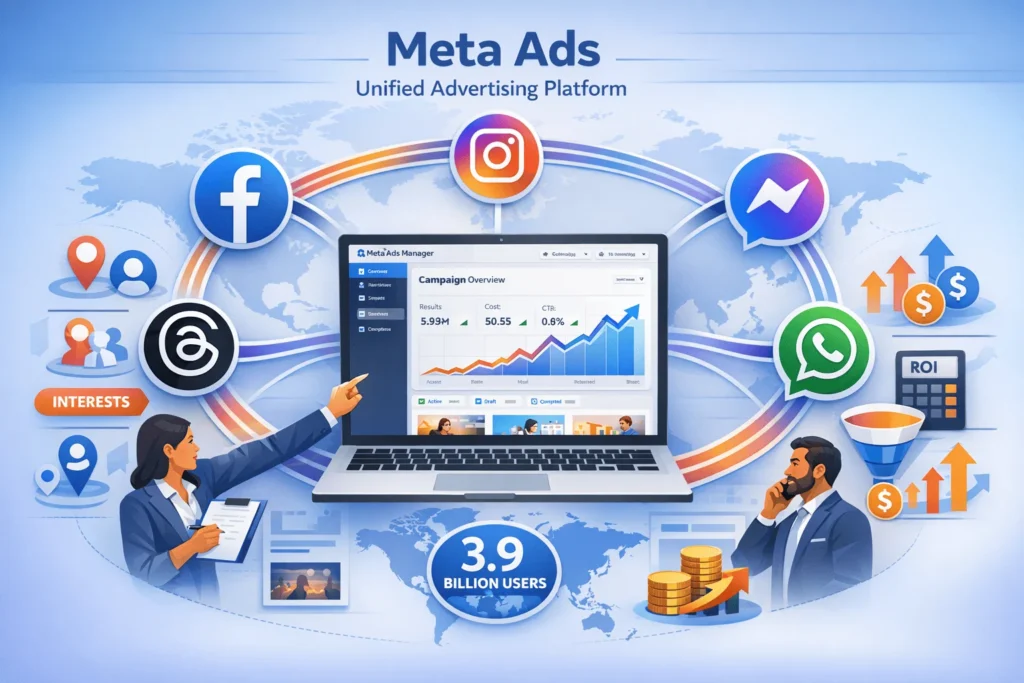
Want to reach 3.9 billion people with one advertising platform? That’s the combined power of Facebook and Instagram through Meta Ads.
Here’s what confuses most beginners: Meta Ads isn’t just “Facebook ads”—it’s a unified advertising system spanning Facebook, Instagram, Messenger, WhatsApp, and Threads.
Meta generated over $160 billion from advertising in 2024, with projections reaching $150-$170 billion by 2026. This massive revenue proves one thing: Meta Ads delivers results businesses are willing to pay for.
But here’s the challenge—Meta Ads Manager looks overwhelming for beginners. Three-level campaign structure. Dozens of objectives. Hundreds of targeting options. Complex bidding strategies.
This complete guide breaks down Meta Ads using a funnel-based strategy, so you understand exactly when to use each campaign type, how to target your perfect customer, and what budget drives profitable ROI.
You’ll learn the 3-level campaign structure, optimal targeting strategies, real-world costs by industry, and how to build ads that convert—all explained in plain language without marketing jargon.
What Are Meta Ads?
Meta Ads = Facebook and Instagram advertising managed through one unified platform called Meta Ads Manager.
When you create a “Meta Ad,” you’re simultaneously advertising across Facebook, Instagram, Messenger, WhatsApp, and Threads from a single dashboard.
Key Meta Ads characteristics:
- Unified platform (manage all placements from Ads Manager)
- 3.9 billion potential reach (combined monthly active users)
- Advanced targeting (demographics, interests, behaviors, custom audiences)
- Multiple objectives (awareness, traffic, engagement, leads, sales)
- Performance-based pricing (pay only for results)
Meta Ads vs. traditional advertising:
- Traditional: “Show my ad to everyone in this city”
- Meta Ads: “Show my ad to 25-45 year-old women in Mumbai interested in yoga who engaged with fitness content last week”
Example: You sell handmade jewelry. With Meta Ads, target women aged 25-40 in Bangalore who follow fashion influencers, engaged with jewelry posts in the last 30 days, and have household income above ₹10 lakh. That’s precision targeting traditional advertising can’t match.
Now let’s understand how Meta Ads actually work behind the scenes.
How Do Meta Ads Work?
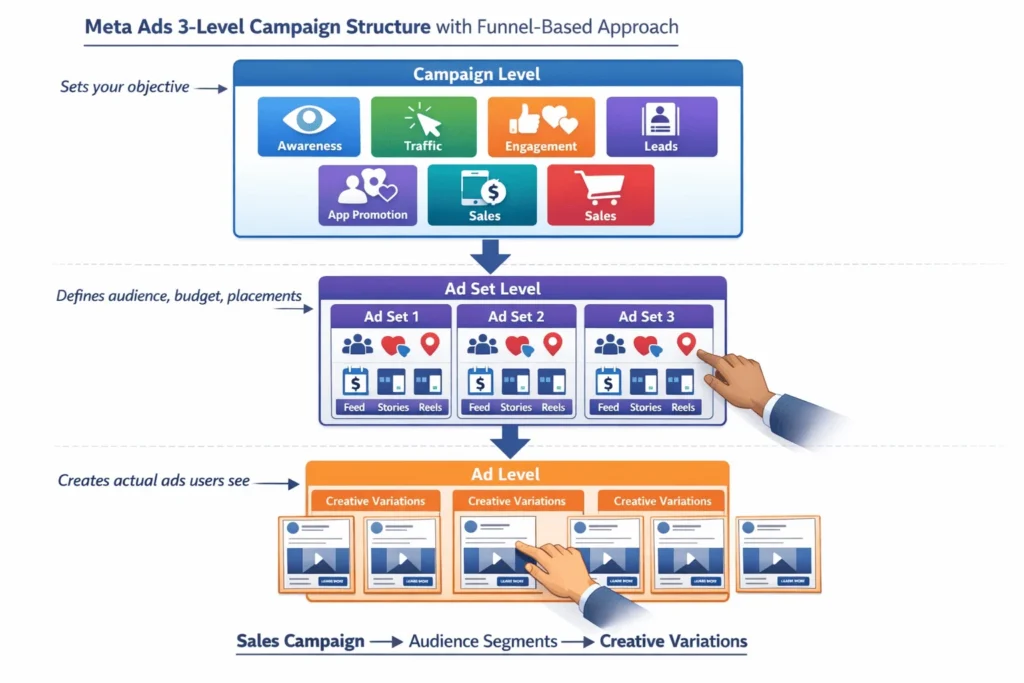
Meta Ads operate on a 3-level hierarchical structure: Campaign → Ad Set → Ad.
Understanding this funnel-based architecture is critical for success—most beginners waste budget because they don’t understand these levels.
Level 1: Campaign (What)
Sets your advertising objective (what you want to achieve).
6 main campaign objectives:
- Awareness – Brand recognition, reach maximum people
- Traffic – Drive visits to website/app
- Engagement – Likes, comments, shares, video views
- Leads – Collect contact information (forms, calls, messages)
- App Promotion – Install or engage with app
- Sales – Drive purchases (e-commerce conversions)
Meta’s algorithm optimizes delivery based on your objective. Choose “Sales” and Meta shows ads to users most likely to purchase. Choose “Traffic” and Meta prioritizes users who click links.
Level 2: Ad Set (Who + When + Where)
Defines WHO sees your ads, WHEN they see them, and WHERE ads appear.
Ad Set controls:
- Audience targeting (demographics, interests, behaviors, custom/lookalike audiences)
- Budget & schedule (daily/lifetime budget, start/end dates, dayparting)
- Placements (Facebook Feed, Instagram Stories, Reels, Messenger, etc.)
- Optimization & bidding (conversion events, bid strategies)
One campaign can have multiple Ad Sets testing different audiences. Example: Ad Set 1 targets men 25-35, Ad Set 2 targets women 35-45.
Level 3: Ad (How)
Creates the actual advertisement users see (visuals, copy, call-to-action).
Ad components:
- Creative format (single image, video, carousel, collection)
- Primary text (ad copy above image)
- Headline (bold text below image)
- Description (additional context)
- Call-to-action button (Shop Now, Learn More, Sign Up)
- Destination (landing page URL)
One Ad Set can contain multiple Ads testing different creatives. Meta automatically shows top performers more frequently through Advantage+ optimization.
What’s the Difference Between Facebook Ads and Instagram Ads?
Facebook Ads and Instagram Ads are both “Meta Ads”—managed from the same platform but with different performance characteristics.
Here’s the data-driven breakdown:
When to choose Facebook:
- Older audience (45+ demographics)
- Detailed targeting (job titles, behaviors, life events)
- Lead generation (forms, gated content)
- Longer content (articles, educational content)
- Broad reach (largest user base)
When to choose Instagram:
- Visual products (fashion, food, lifestyle, beauty)
- Younger audience (18-34 demographics)
- E-commerce (14% higher conversion rate )
- Brand awareness (engaging visual content)
- Influencer marketing (creator collaborations)
Pro strategy: Don’t choose—use both simultaneously. Meta Ads Manager’s “Advantage+ Placements” automatically distributes budget to top-performing platforms.
“Instagram typically shows higher ROI for e-commerce with 1.85% conversion rate vs Facebook’s 1.62%,” according to Social Pulse Stats analysis.
Understanding placement differences is crucial, but targeting determines success. Let’s explore Meta’s powerful targeting options.
How Does Meta Ads Targeting Work?
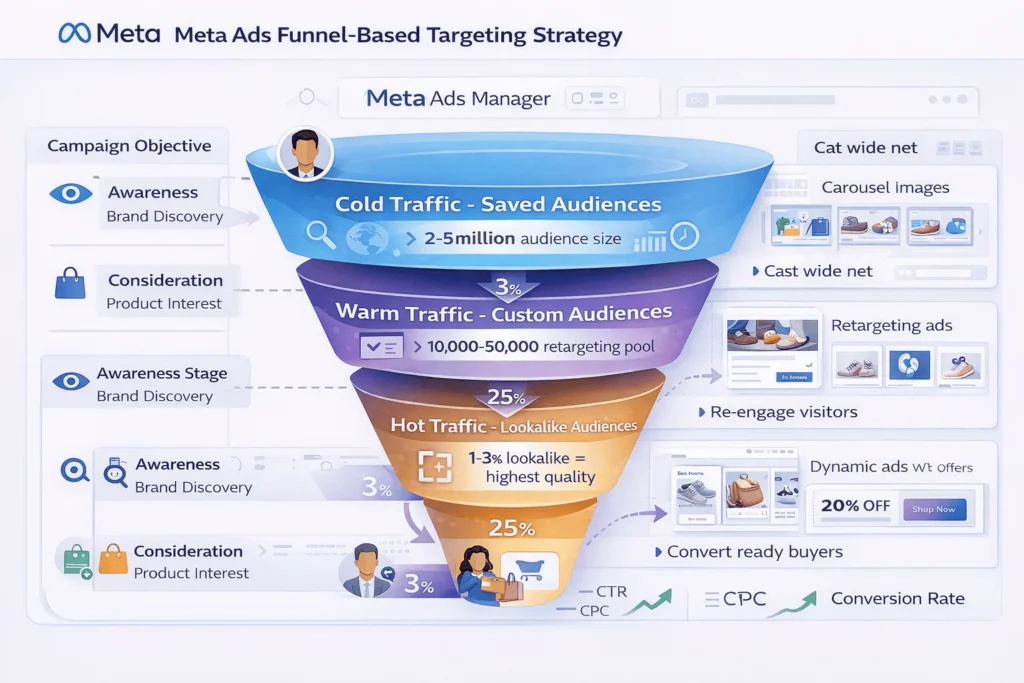
Meta Ads targeting uses 3 audience types: Saved Audiences, Custom Audiences, and Lookalike Audiences.
This funnel-based targeting strategy matches audience type to buyer journey stage.
Saved Audiences (Cold Traffic – Awareness Stage)
Target users who don’t know your brand using demographic, geographic, and interest filters.
Targeting parameters:
1. Demographics:
- Age (13-65+ in single-year increments)
- Gender (men, women, all)
- Education (high school, college, degree, field of study)
- Job titles (specific positions or industries)
- Life events (recently engaged, new parents, birthdays)
- Relationship status (single, married, engaged)
2. Location:
- Country, region, state, city, postal code
- Radius targeting (1-50 mile radius around address)
- DMA (Designated Market Area for media buyers)
3. Interests:
- Business & Industry (entrepreneurs, small business, B2B)
- Entertainment (movies, music, TV shows, gaming)
- Family (parenting, education)
- Fitness & Wellness (gyms, yoga, nutrition)
- Food & Drink (restaurants, cooking, wine)
- Hobbies (photography, art, crafts)
- Shopping & Fashion (clothing, accessories, luxury goods)
- Sports (specific teams, leagues, activities)
- Technology (gadgets, software, AI)
- Travel (destinations, airlines, hotels)
4. Behaviors:
- Purchase behavior (online shoppers, frequent travelers)
- Device usage (iOS vs Android, specific devices)
- Travel (frequent flyers, commuters)
- Financial (household income, spending patterns)
- Digital activities (early tech adopters, small business owners)
Example Saved Audience:
“Women aged 25-40 in top 8 Indian metros interested in sustainable fashion, organic lifestyle, and yoga who use iPhone and have household income ₹15 lakh+”
Custom Audiences (Warm Traffic – Consideration Stage)
Target users who already interacted with your brand (website visitors, app users, customer lists, engagers).
4 Custom Audience types:
1. Website Custom Audience:
- Visitors to specific pages (product pages, pricing, blog posts)
- Time-based segments (visited last 7/14/30/60/90/180 days)
- Event-based (added to cart, viewed content, initiated checkout)
2. Customer List Audience:
- Upload email addresses, phone numbers, user IDs
- Match rate typically 50-70%
- Perfect for existing customer retargeting or exclusion
3. Engagement Audience:
- Video viewers (25%, 50%, 75%, 95%, 100% watched)
- Instagram profile visitors or engagers
- Facebook Page visitors or button clickers
- Form openers (didn’t submit)
- Lead form submitters
4. App Activity Audience:
- Users who opened app, completed tutorial, reached level, made purchase
- Track custom in-app events
Example Custom Audience:
“People who visited your website in last 14 days, viewed at least 3 product pages, but didn’t purchase + People who engaged with Instagram posts in last 30 days”
Lookalike Audiences (Cold Traffic – Scaling Stage)
Target new users similar to your best customers using Meta’s AI matching.
How Lookalike Audiences work:
- Choose source audience (Custom Audience of purchasers, high-value customers, or top engagers)
- Select country/region
- Choose percentage (1%-10%)
- 1% = most similar (narrow, high-quality, expensive)
- 5% = moderate similarity (balanced reach and quality)
- 10% = loosest match (maximum reach, lower quality)
Example Lookalike Audience:
“3% Lookalike of customers who purchased in last 90 days, located in India” (creates audience of ~60 million similar users)
Meta’s AI analyzes thousands of data points to find patterns: demographics, interests, behaviors, online activities, device usage, and engagement patterns.
Targeting defines WHO sees your ads. Now let’s examine WHAT you’ll pay.
How Much Do Meta Ads Cost?
Meta Ads pricing varies dramatically by industry, objective, targeting, and competition.
Here are real 2026 benchmarks to set realistic budget expectations:
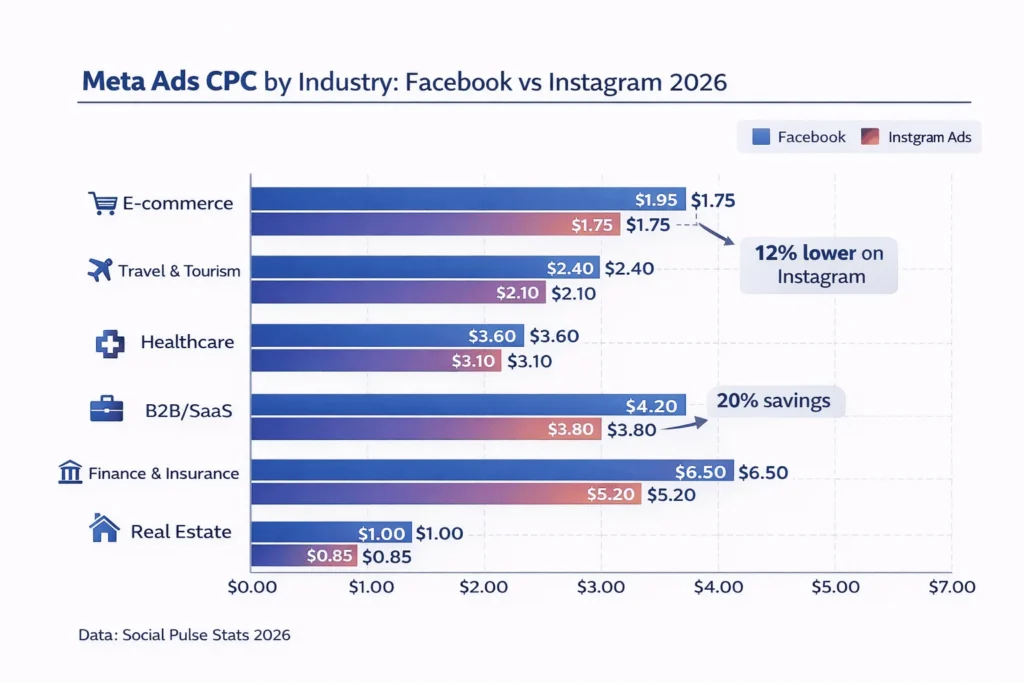
Cost Per Click (CPC) by Industry
Overall average CPC: $0.26 – $0.97
Industry-specific CPC benchmarks:
Why such variation? Competition drives CPC. Finance and insurance have high customer lifetime value (₹50,000-₹5 lakh+), so advertisers bid aggressively. E-commerce has lower LTV (₹500-₹5,000), resulting in lower CPC.
Cost Per Thousand Impressions (CPM)
Overall average CPM: $1.01 – $4.00
Placement-specific CPM benchmarks:
Facebook CPM:
- Feed ads: $14.40 average (premium placement, highest engagement)
- Right column ads: $8.90 (cheaper but lower engagement)
- Video ads: $18.60 (premium for video content)
- Stories ads: Variable ($10-$16 typical)
Instagram CPM:
- Feed ads: $13.20 average
- Stories ads: $11.80 (excellent value, growing format)
- Reels ads: $15.90 (newest format, high engagement)
- Shopping ads: $16.50 (highest conversion potential)
CPM is best for awareness campaigns where you want maximum impressions. CPC is better for performance campaigns where actions matter.
Monthly Budget Recommendations
Minimum viable budgets for meaningful results:
1. Small business (testing phase):
- Budget: $500-$1,000/month ($15-$30/day)
- Focus: Single objective, narrow targeting
- Expectation: Learn what works, minimal conversions
2. Growing business (optimization phase):
- Budget: $2,000-$5,000/month ($65-$165/day)
- Focus: A/B testing, retargeting, scaling winners
- Expectation: Consistent lead flow or sales
3. Established business (scaling phase):
- Budget: $10,000-$50,000+/month ($330-$1,650+/day)
- Focus: Full-funnel strategy, advanced targeting, aggressive scaling
- Expectation: Predictable ROI, high volume
Pro tip: Start small, test, scale winners. Better to spend $1,000 learning your audience than waste $10,000 on untested campaigns.
Explore proven Instagram advertising formats and costs to optimize your Meta Ads strategy.
What ROI Can You Expect from Meta Ads?
Return on Ad Spend (ROAS) determines profitability.
Meta Ads average ROAS: 2:1 to 8:1 depending on industry, funnel optimization, and creative quality.
ROAS Benchmarks by Business Type
E-commerce:
- Average ROAS: 4:1 (₹4 revenue per ₹1 spent)
- Top performers: 8-10:1
- Instagram ROAS: 4.2:1 average
- Facebook ROAS: 3.8:1 average
B2B/SaaS:
- Average ROAS: 2.5-3:1 (longer sales cycles)
- Cost per lead: $50-$200
- Lead-to-customer conversion: 5-15%
Local services (restaurants, gyms, salons):
- Average ROAS: 3-5:1
- Cost per booking: $5-$25
- Focus on radius targeting and location-based campaigns
Real estate:
- Cost per lead: $1,000-$6,000
- High LTV justifies high CPA (customer lifetime value: ₹5 lakh – ₹5 crore+)
ROI Calculation Example
Scenario: E-commerce fashion brand
Monthly ad spend: ₹50,000
Total revenue: ₹2,10,000
ROAS: 2,10,000 ÷ 50,000 = 4.2:1
Gross margin: 60% (₹1,26,000)
Net profit after ad spend: ₹1,26,000 – ₹50,000 = ₹76,000 profit
ROI: (76,000 ÷ 50,000) × 100 = 152% ROI
Key insight: ROAS shows revenue efficiency, ROI shows actual profit. Always calculate both—high ROAS means nothing if margins are low.
“The average business makes $8 in revenue for every $1 spent on Meta Ads,” according to HubSpot ROI research.
Understanding costs and ROI sets expectations. Now let’s build your first campaign step-by-step.
How To Create Your First Meta Ads Campaign
Follow this funnel-based structure to launch profitable Meta Ads in under 30 minutes.
Times Needed: 30 minutes
Estimated Cost: 500 USD(monthly testing budget)
Description: Complete step-by-step guide to creating, launching, and optimizing your first Meta Ads campaign using funnel-based strategy for maximum ROI and conversions.
Step 1: Set Up Meta Business Manager Account
Step Title: Create Meta Business Manager & Connect Assets
Step Description: Go to business.facebook.com, create Business Manager account, connect Facebook Page and Instagram account, add payment method, and install Meta Pixel on website for conversion tracking.
Why this matters: Business Manager separates personal and business assets, enables team collaboration, provides advanced features not available in personal accounts, and protects ad account from being disabled.
Step 2: Install Meta Pixel for Conversion Tracking
Step Title: Add Meta Pixel to Your Website
Step Description: Navigate to Events Manager, create Meta Pixel, copy tracking code, install on website header (or use plugin for WordPress/Shopify), verify pixel fires correctly using Meta Pixel Helper Chrome extension.
Why this matters: Without pixel tracking, you can’t measure conversions, retarget website visitors, or optimize for purchase events. Pixel data powers all advanced targeting and optimization.
Step 3: Define Campaign Objective Based on Funnel Stage
Step Title: Choose Right Campaign Objective for Your Goal
Step Description: Click “+ Create” in Ads Manager, select objective matching business goal: Awareness (reach new audiences), Traffic (website visits), Engagement (post interactions), Leads (form submissions), Sales (purchases).
Why this matters: Objective determines how Meta’s algorithm delivers ads. Choose Sales, Meta shows ads to users most likely to purchase. Choose Traffic, Meta prioritizes clicks regardless of purchase intent.
Step 4: Set Up Ad Set with Targeting & Budget
Step Title: Configure Audience Targeting and Daily Budget
Step Description: Choose location and demographics, add interest and behavior targeting (3-5 interests max), set daily budget ($15-$30 for testing), select automatic placements (Facebook + Instagram + Stories + Reels).
Why this matters: Narrow targeting wastes budget on small audiences. Start with 500,000-2 million audience size for optimal delivery. Meta’s algorithm needs volume to find converters.
Step 5: Create Ad Creative with Proven Format
Step Title: Design High-Converting Ad Visual and Copy
Step Description: Upload eye-catching image or video (1080x1080px square or 9:16 vertical for Stories), write benefit-focused primary text (125 characters), add clear headline (40 characters), select strong CTA button, add landing page URL.
Why this matters: Creative quality determines 70% of ad performance. Poor creative with great targeting loses. Great creative with decent targeting wins. Test 3-5 creative variations to identify top performers.
Step 6: Launch Campaign and Monitor Key Metrics
Step Title: Publish Campaign and Track Performance Daily
Step Description: Review all settings, click “Publish” to launch, monitor daily for first 72 hours checking: CTR (click-through rate), CPC, relevance score, conversion rate. Adjust budget or pause underperforming ads after 3-day learning phase.
Why this matters: Meta’s algorithm needs 50 conversions per ad set per week to optimize effectively. Don’t judge performance before 50-100 link clicks or 3-7 days of data collection.
Tools Name: Meta Ads Manager, Meta Business Suite, Meta Pixel Helper, Canva
Materials Name: Product images, website landing page, payment method, business verification documents
Discover advanced Facebook ads targeting strategies to maximize your campaign ROI.
What Are Meta Advantage+ Campaigns?
Advantage+ = Meta’s AI-powered campaign automation that removes manual controls and lets the algorithm make decisions.
How Advantage+ works:
Traditional manual campaigns:
- You choose audiences (interests, demographics)
- You select placements (Feed, Stories, Reels)
- You set bidding strategies
- You test creative variations manually
Advantage+ campaigns:
- Meta’s AI chooses audiences (no manual targeting)
- Meta selects placements (algorithm distributes budget)
- Meta tests creatives dynamically (shows best performers)
- Meta allocates budget fluidly (shifts to top performers automatically)
Advantage+ Shopping Campaigns are designed specifically for e-commerce, optimizing directly for purchases at scale.
When to use Advantage+:
✅ Use Advantage+ when:
- You have 50+ conversions per week (algorithm needs data)
- Your pixel is well-trained (6+ months of purchase data)
- You want to scale quickly (automation handles complexity)
- You have proven creative (good ads + automation = explosive growth)
- E-commerce focus (Advantage+ Shopping optimizes for product sales)
❌ Don’t use Advantage+ when:
- New account with limited conversion history
- Complex targeting needed (specific job titles, niche interests)
- Lead generation campaigns (Advantage+ works best for sales)
- Limited budget under $1,000/month (not enough data volume)
- Need control over placements or audiences
Pro insight: In 2026, Meta increasingly pushes Advantage+, making manual interest targeting matter less than conversion signals and creative quality.
“If your account sends strong, consistent purchase signals, Advantage+ can find buyers far outside any predefined audience,” according to WeTracked analysis.
Advantage+ simplifies campaign management, but measuring results determines profitability. Let’s examine key metrics.
What Metrics Should You Track in Meta Ads?
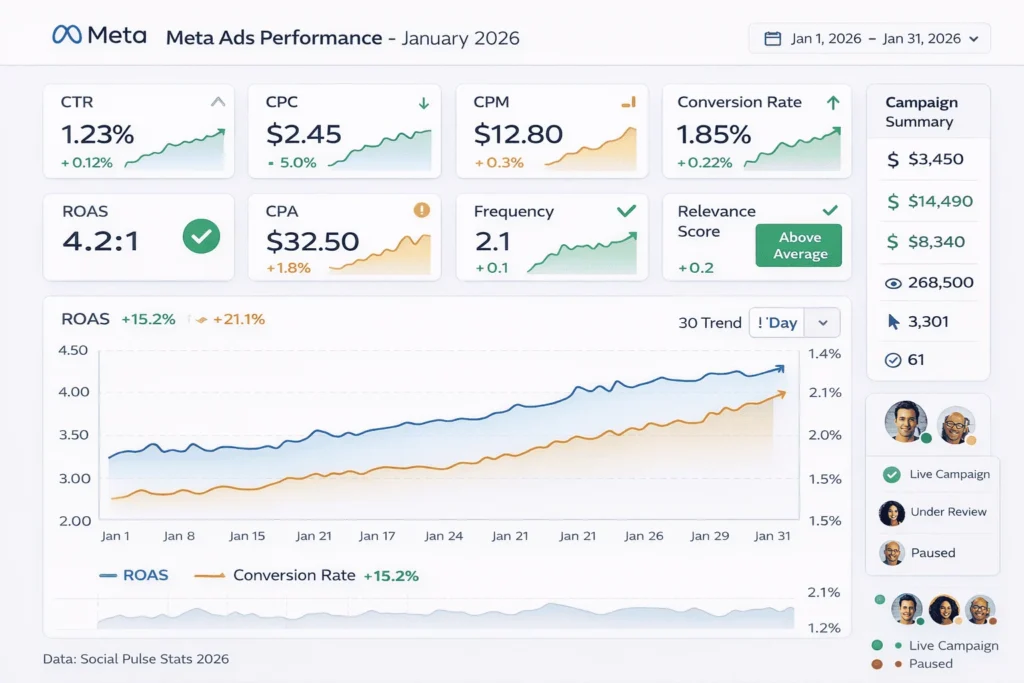
Track these 8 metrics to understand campaign performance and optimize for profit:
1. Click-Through Rate (CTR)
Formula: (Clicks ÷ Impressions) × 100
Benchmark: 0.90-1.61% average across industries
What it means: Percentage of people who click your ad after seeing it.
Why it matters: Low CTR = poor creative or wrong audience. High CTR = engaging ad, right targeting. CTR below 0.5% requires creative refresh.
2. Cost Per Click (CPC)
Formula: Total Spend ÷ Link Clicks
Benchmark: $0.26 – $6.50 (varies by industry)
What it means: How much you pay for each website click.
Why it matters: Directly impacts profitability. Lower CPC = more traffic for budget. CPC increasing? Improve creative quality or narrow targeting.
3. Cost Per Thousand Impressions (CPM)
Formula: (Total Spend ÷ Impressions) × 1,000
Benchmark: $1.01 – $18.60 (varies by placement)
What it means: Cost to show ad to 1,000 people.
Why it matters: Measures ad competitiveness. Rising CPM = increased competition or lower ad quality. Monitor seasonality spikes (holidays, sales events).
4. Conversion Rate
Formula: (Conversions ÷ Clicks) × 100
Benchmark: 1.62% (Facebook), 1.85% (Instagram)
What it means: Percentage of clickers who complete desired action (purchase, sign-up).
Why it matters: Most critical metric for ROI. Low conversion rate despite high CTR? Landing page problem, not ad problem.
5. Return on Ad Spend (ROAS)
Formula: Revenue ÷ Ad Spend
Benchmark: 2:1 to 8:1 depending on business
What it means: Revenue generated per dollar spent.
Why it matters: Determines campaign profitability. 4:1 ROAS = ₹4 revenue per ₹1 spent. Calculate break-even ROAS using formula: 1 ÷ Gross Margin %.
6. Cost Per Acquisition (CPA)
Formula: Total Spend ÷ Conversions
Benchmark: Varies dramatically (₹50-₹10,000+ depending on product/service)
What it means: How much you pay to acquire one customer.
Why it matters: Must be lower than customer lifetime value. If CPA > LTV, you’re losing money on every customer.
7. Frequency
Formula: Impressions ÷ Reach
Benchmark: 1.0-3.0 ideal, above 4.0 = ad fatigue
What it means: Average times each person saw your ad.
Why it matters: High frequency (4+) causes ad fatigue, reducing CTR and increasing CPC. Refresh creative when frequency exceeds 3.5.
8. Relevance Score (Quality Ranking)
Scale: Below Average, Average, Above Average
What it means: Meta’s assessment of ad quality and audience fit.
Why it matters: Low relevance = higher costs and worse delivery. Improve by better audience targeting, more engaging creative, clearer value proposition.
Daily monitoring routine:
- Check CTR and CPC (spot performance issues immediately)
- Monitor conversion rate (indicates landing page effectiveness)
- Track ROAS (determines profitability)
- Watch frequency (refresh creative before ad fatigue)
FAQ: Meta Ads for Business Growth
What’s the minimum budget needed to start Meta Ads?
Minimum $15-$30 per day ($500-$1,000/month) for meaningful testing. Lower budgets limit Meta’s algorithm ability to optimize—you need minimum 50 conversions per week for effective learning. Start with $500 testing budget, scale winners to $2,000-$5,000/month.
Should I advertise on Facebook or Instagram?
Use both simultaneously through Advantage+ Placements. Meta’s algorithm distributes budget to top-performing platform automatically. Instagram delivers 14% higher conversion rates for e-commerce (1.85% vs 1.62%), while Facebook offers broader reach (2.9 billion vs 2.4 billion users).
How long does it take to see results from Meta Ads?
Initial data in 3-7 days, meaningful results in 30-60 days. Meta’s algorithm needs 50 conversions per ad set per week to optimize effectively. Don’t judge performance before 100+ link clicks or 1 week of data. Scale winners after 30 days of consistent performance.
What’s a good ROAS for Meta Ads?
4:1 ROAS is good, 6:1+ is excellent for most businesses. Calculate your break-even ROAS: 1 ÷ Gross Margin %. If you have 60% margin, break-even ROAS = 1.67:1. Aim for 2-3x your break-even ROAS for profitable scaling. E-commerce averages 4.2:1, B2B averages 2.5-3:1.
How do I reduce Meta Ads costs?
7 proven tactics to lower CPC and CPM: (1) Improve creative quality—engaging visuals reduce costs 40-60%, (2) Narrow targeting to highly relevant audiences, (3) Use automatic placements for lower CPM, (4) Refresh creative when frequency exceeds 3.5, (5) Optimize landing pages to improve relevance score, (6) Test video ads—often 20-30% lower CPC, (7) Schedule ads during off-peak hours (weekdays vs weekends).
What’s the difference between Campaign, Ad Set, and Ad?
Campaign = WHAT (objective: sales, leads, traffic). Ad Set = WHO + WHEN + WHERE (audience, budget, placement). Ad = HOW (creative, copy, CTA). This 3-level structure separates strategy (campaign), targeting (ad set), and execution (ad). One campaign can have 3-5 ad sets testing audiences, each with 3-5 ads testing creatives.
Should I use Advantage+ or manual campaigns?
Use Advantage+ if you have 50+ conversions per week and well-trained pixel (6+ months data). Advantage+ AI finds buyers beyond manual targeting when conversion signals are strong. Use manual campaigns for: new accounts with limited data, complex targeting (specific job titles), lead generation, or budgets under $1,000/month needing precise control.
How do I track Meta Ads ROI accurately?
Install Meta Pixel and Conversion API (CAPI) for accurate tracking. Set up custom conversion events: ViewContent (awareness), AddToCart (consideration), Purchase (conversion). Connect Ads Manager to Google Analytics for cross-platform verification. Calculate ROI: (Revenue – Ad Spend – Product Cost) ÷ Ad Spend × 100. Track Customer Lifetime Value (CLV), not just first purchase—repeat customers determine true profitability.
Key Takeaways
1. Meta Ads = unified platform advertising across Facebook, Instagram, Messenger, WhatsApp, and Threads—3.9 billion potential reach with single campaign.
2. 3-level structure is fundamental: Campaign (objective), Ad Set (audience + budget + placement), Ad (creative + copy). Understanding this hierarchy prevents 90% of beginner mistakes.
3. Funnel-based targeting strategy: Saved Audiences for cold traffic (awareness), Custom Audiences for warm traffic (consideration), Lookalike Audiences for scaling.
4. Instagram delivers better ROI for e-commerce: 1.85% conversion rate vs Facebook’s 1.62%, 4.2:1 ROAS vs 3.8:1, and 12% lower CPC.
5. Budget minimums matter: $500-$1,000/month minimum for meaningful testing. Meta’s algorithm needs 50 conversions per week to optimize effectively.
6. Cost varies dramatically by industry: E-commerce $1.95 CPC, B2B/SaaS $4.20 CPC, Finance/Insurance $6.50 CPC. Plan budgets accordingly.
7. Average ROAS is 4:1 for e-commerce, 2.5-3:1 for B2B. Calculate break-even ROAS (1 ÷ Gross Margin %) to determine profitability threshold.
8. Advantage+ automation works when you have data: 50+ conversions per week, 6+ months pixel history, proven creative. Don’t use for new accounts or complex targeting.
9. Track 8 critical metrics: CTR (ad engagement), CPC (traffic cost), CPM (impression cost), Conversion Rate (landing page), ROAS (revenue efficiency), CPA (acquisition cost), Frequency (ad fatigue), Relevance Score (quality).
10. Creative quality determines 70% of performance. Test 3-5 visual variations, refresh when frequency exceeds 3.5, focus on benefit-driven copy.
11. Meta Pixel installation is non-negotiable for conversion tracking, retargeting, and Lookalike Audiences. Without pixel data, you’re advertising blind.
12. Placement strategy: Use Advantage+ automatic placements for algorithm optimization. Meta distributes budget to top-performing placements (Feed, Stories, Reels) automatically.
Next Steps
Ready to launch profitable Meta Ads campaigns? Here’s your action plan:
1. Set up foundation (Week 1):
- Create a Meta Business Manager account at business.facebook.com
- Connect the Facebook Page and the Instagram profile
- Install Meta Pixel on website (use WordPress/Shopify plugin for easy setup)
- Add payment method and verify business
2. Define strategy (Week 1):
- Choose primary objective (awareness, traffic, leads, or sales)
- Map customer journey stages (awareness → consideration → conversion)
- Set a realistic budget ($500-$1,000 for Month 1 testing)
- Identify 3-5 audience segments to test
3. Create first campaign (Week 2):
- Start with Sales objective if e-commerce, Leads if service business
- Use Saved Audience targeting: location + demographics + 3-5 interests
- Set a $20-$30 daily budget for 30 days
- Create 3-5 ad variations, testing different visuals
4. Monitor and optimize (Weeks 3-4):
- Check metrics daily: CTR, CPC, conversion rate, ROAS
- Let campaigns run 72 hours before making changes (learning phase)
- Pause ads with CTR below 0.5% or CPC 2x higher than benchmarks
- Scale winners by increasing budget 20% every 3-4 days
5. Build retargeting funnel (Month 2):
- Create a Custom Audience of website visitors (last 30 days)
- Launch a retargeting campaign targeting cart abandoners
- Test dynamic product ads for e-commerce
- Build Lookalike Audiences from purchasers
Start your first Meta Ads campaign today and use funnel-based targeting to guide customers from awareness to purchase. Test, measure, optimize, scale.
Talk to StartupMandi’s digital marketing experts to build a custom Meta Ads strategy optimized for your business goals, budget, and industry. Book a free consultation.
Conclusion
Meta Ads isn’t just “Facebook advertising”—it’s a unified ecosystem reaching 3.9 billion users across Facebook, Instagram, Messenger, WhatsApp, and Threads.
The platform’s power comes from precision targeting (demographics + interests + behaviors), proven ROI (4:1 average ROAS for e-commerce), and a funnel-based campaign structure that guides customers from awareness to purchase.
Three things determine Meta Ads success:
1. Strategic structure: Campaign (objective) → Ad Set (audience + budget) → Ad (creative). This hierarchy isn’t complex—it’s a logical separation between strategy, targeting, and execution.
2. Funnel-based targeting: Cold traffic (Saved Audiences) → Warm traffic (Custom Audiences) → Scale (Lookalike Audiences). Match audience type to buyer journey stage.
3. Data-driven optimization: Install Meta Pixel, track 8 key metrics (CTR, CPC, CPM, conversion rate, ROAS, CPA, frequency, relevance score), test 3-5 creative variations, refresh ads before fatigue, scale winners systematically.
The minimum viable budget is $500-$1,000/month for testing, scaling to $2,000-$5,000/month as you identify winning campaigns. Start small, learn your audience, double down on what converts.
Meta Ads works for every business type—e-commerce sees 1.85% conversion rates on Instagram, B2B generates qualified leads at $50-$200 per lead, and local services book customers at $5-$25 per acquisition.
Start your first Meta Ads campaign this week. Set up Business Manager, install Pixel, define objective, target 500K-2M audience, create 3 ad variations, launch with $20-$30 daily budget. Monitor for 72 hours, optimize based on data, scale winners by 20% every 3-4 days.
Work with StartupMandi to build a custom Meta Ads strategy combining Facebook and Instagram advertising for maximum ROI. Our performance marketing experts optimize targeting, creative, and funnel structure to reduce costs and increase conversions. Schedule your free strategy session.
Follow StartupMandi for weekly Meta Ads insights, case studies, and proven strategies that drive measurable business growth through paid social advertising.
Resources for Meta Ads Success
Official Meta Resources:
- Meta Business Suite – Campaign management dashboard
- Meta Ads Manager – Create and monitor campaigns
- Facebook Blueprint – Free Meta Ads certification courses
- Meta Pixel Helper – Chrome extension to verify tracking
Creative Design Tools:
- Canva – Design ad visuals, and videos
- Adobe Express – Professional creative templates
- Meta Creative Hub – Preview ads across placements
Analytics & Optimization:
- Google Analytics 4 – Cross-platform conversion tracking
- Meta Ads Library – Research competitor ads
- HubSpot ROAS Calculator – Calculate ad profitability
Learning Resources:
- Meta for Business Help Center – Official documentation
- Jon Loomer Digital – Advanced Meta Ads strategies
- AdEspresso Blog – Meta Ads tutorials and case studies
About StartupMandi
StartupMandi empowers online businesses with data-driven Meta Ads strategies that reduce acquisition costs and maximize ROAS through funnel-based campaign optimization.
Our Meta Ads services include:
- Meta Ads strategy & audit (campaign structure, targeting, creative analysis)
- Campaign setup & management (Business Manager, Pixel, Conversion API)
- Funnel optimization (awareness → consideration → conversion campaigns)
- Creative testing & production (high-converting ad visuals and copy)
- Advanced targeting strategies (Custom Audiences, Lookalikes, retargeting)
- Performance tracking & reporting (ROI dashboard, attribution modeling)
- Free initial consultation (30-minute strategy session)
Schedule your free Meta Ads consultation to discuss your business goals, target audience, budget, and industry. We’ll create a custom roadmap showing exactly how to structure campaigns for maximum ROI.
Follow StartupMandi for weekly Meta Ads insights, performance benchmarks, targeting strategies, and case studies proven to drive business growth through Facebook and Instagram advertising.