Nothing OS 4.0 Stable Release: What’s New in the Android 16-Based Update?
The much-anticipated Nothing OS 4.0, based on Android 16, is rolling out as a stable update, and it’s packed with several refinements aimed at modernizing Nothing Phone experiences. If you’ve been following the beta releases, you’re probably eager to know what actually made it to the public build, how the update enhances the Nothing ecosystem, and whether it’s worth installing right away. Although many features were teased, the finalized OS brings a significant shift in design ethos as well as practicality. Consequently, users will experience both bolder styling and a smarter interface—hallmarks of Carl Pei’s iterative vision for the brand.
 Nothing OS 4.0 Stable Release: Modern UI and Animated Glyph Features
Android 16 Foundation: Security, Fluidity, and More Control
Nothing OS 4.0 marks the company’s fastest-ever Android update, as it launches almost in parallel with Google’s own OS build[9to5google]. Android 16’s arrival on Nothing Phone helps users benefit from crucial privacy enhancements, better on-device AI features, and a more flexible notification pipeline. Still, Nothing has retained its unique UX identity. Unlike many generic Android skins, Nothing OS 4.0 uses animation and minimalism to drive focus without overwhelming with excess color or bloat. Furthermore, better resource management keeps the phone feeling zippy after hours of use.
Moreover, the update introduces Android 16’s predictive back gesturing (see Google’s blog), making app navigation effortless. As a result, one-handed use feels easier and more forgiving, especially when switching between apps. In addition to the usability gains, background process optimizations ensure that even intensive multitasking won’t slow the latest Nothing Phones.
Redesigned Glyph Interface: Live Updates and More
Arguably, the biggest visual leap is the revamp of the Glyph interface. Now, glyph LEDs provide live activity updates whenever you’re on select notifications or performing certain actions[9to5google]. This means that while your phone is face-down or silenced, you no longer miss crucial information—notifications pulse in distinctive patterns that you choose. Because Nothing OS 4.0 introduces more dynamic preset options and animation styles, personalization reaches new heights. Naturally, this also extends to calls, music, and app alerts, allowing a seamless glance-at-a-glance experience—ideal for meetings or focus sessions.
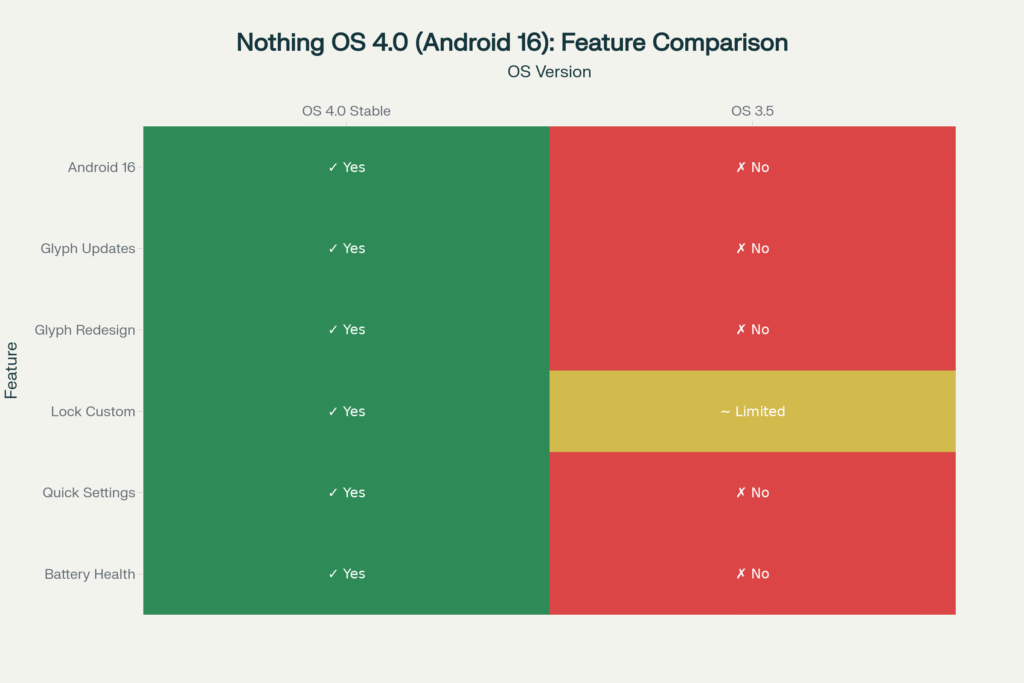 Nothing OS 4.0 brings Android 16, live Glyph updates, new lock screen options, and battery analytics—an upgrade over OS 3.5 Checkout Our Latest Services
The Glyphs no longer just blink generically—they sync with new features like timer progress bars, delivery tracking, and even ride-hailing status. Since each phone’s glyph pattern can be customized per app or contact, users wanting more granular control are now satisfied.
Nothing OS 4.0 – Lock Screen Customization: Next-Gen Visuals and Widgets
After the rollout, users immediately notice the new lock screen customization options. Through a modular approach, you can add multiple clock styles, quick-view widgets, or even app shortcuts directly on the lock screen. Additionally, Nothing uses adaptive brightness and dark/light mode toggles so the screen appearance remains both practical and visually appealing regardless of time or environment.
Android 16 compatibility means richer widgets and rapid glance info, such as weather, upcoming meetings, or health stats. Although these options were limited in previous versions, Nothing OS 4.0 delivers parity with premium Android flagships. As a result, users who crave more personalization or want their phone to double as a subtle dashboard will find plenty to like.
Revamped Quick Settings and Control Panel
Nothing OS 4.0 debuts a completely refreshed Quick Settings panel. Now, new toggle shapes and accent colors fit better with the OS’s minimalist aesthetic. Besides, improved organization of key Wi-Fi, Bluetooth, and battery controls means quicker access to what matters most. Rather than requiring deep dives through Settings, core actions are just a swipe away. Furthermore, an “AOD” (Always-on Display) Quick Edit function enables you to rearrange information or enable/disable at will.
Battery Health Analytics: Advanced Energy Insights
Staying informed about your hardware becomes easier, too. For the first time, Nothing OS offers advanced Battery Health Analytics. This tracks capacity, charge cycles, and projects battery longevity. Since mobile longevity is a key buying factor, Nothing’s addition reassures tech-savvy buyers that their investment will last. If warnings pop up when battery health slips, owners can decide when to seek service well ahead of a drop in day-to-day life.
Additionally, the analytics integrate with new Android 16 machine learning APIs, meaning energy predictions become smarter over time.
Nothing OS 4.0 – Compatibility and Eligible Devices
Right now, the stable Nothing OS 4.0 update is rolling out to Nothing Phone (2) users first, with staggered availability for the Nothing Phone (1) and the performance-focused (2a) variants expected within weeks[livemint]. While beta testers get immediate access, regular users should check manually for updates via Settings > System Update. If you don’t see the update, it may take a few days depending on region and carrier. Importantly, Nothing has also pledged to bring OS 4.0’s biggest visual and privacy enhancements to previous models as long as hardware allows.
Should You Update Right Away?
For most users, updating quickly is a safe bet. Not only does Nothing OS 4.0 bring you up to speed with the broader Android ecosystem, but it also includes security patches, bug fixes, and smarter device management. Although some niche apps might need a day or two to patch for compatibility, that’s a common risk for any major OS transition.
Power users, on the other hand, may want to backup their phones beforehand. Additionally, reading through forums or the official Nothing support board for user feedback is wise. Since user interface and default animation style changes are subjective, a little preview before updating helps set expectations.
Final Thoughts: How Nothing OS 4.0 Levels Up the Game
Nothing OS 4.0, riding atop Android 16, is more than a visual overhaul—it’s an all-rounder update. There’s smarter battery usage, privacy tools, richer animation, and live Glyph feedback. Perhaps most importantly, the Android core is up to date, ensuring long support cycles and fewer security worries. Ultimately, this combination of clever features and minimal visual flair embodies the “technology should be beautiful and invisible” philosophy Carl Pei built Nothing around.
For Android fans looking for something different yet future-proof, this update is a compelling reason to consider (or stick with) the Nothing ecosystem. If you value style with substance, it’s time to tap that update button.
Explore Further: